Search results for tag #opensource
![[?]](https://autistics-life.s3.bhs.io.cloud.ovh.net/accounts/avatars/114/613/151/536/635/497/original/cbb662781ca90d08.jpeg)
@autistics Massive revamp to the "Wrong Planet" Forum. Uses #Discourse now! So much better on mobile!
https://discourse.wrongplanet.net
#OpenSource
![[?]](https://files.sueden.social/accounts/avatars/109/247/372/444/483/702/original/2e04c702652c734d.jpg)
My Android app project Blitzortung Lightning Monitor is about to pass 2 million installs — 14 years of a mostly one-person side project. No ads, no tracking, no business model. Just lightning.
https://wuerl.net/post/blitzortung/14-years-and-2-million-installs-later/
![[?]](https://media.infosec.exchange/infosec.exchange/accounts/avatars/109/295/362/026/663/569/original/0ef3f34cedf9edaa.jpeg)
svg-sanitize rebuilds untrusted SVG as static vector graphics only. It does not simply search and replace script tags. It parses XML with defusedxml, checks resource limits, and constructs an entirely new XML tree from a small, explicit allowlist of elements, attributes, and valid values.
Thanks to @wachizungu for the initial idea at the @hack_lu hackathon and also @therealsaumil to trigger me again about SVG at the 20th edition hack.lu ;-)
It's a prototype and maybe utterly broken.
![[?]](https://media.mastodontech.de/accounts/avatars/117/115/887/807/900/475/original/89a90724ec0ffe68.png)
💬 „Mein Tipp: Einfach machen!“
Wie erlebt Inge Kloepfer Linux im Alltag? 🐧💻 Was hat sie beim Wechsel zu Open Source überrascht?
Im Interview erzählt sie von ihren Erfahrungen mit ihrem TUXEDO-Notebook. 🇪🇺
#Linux #OpenSource #TUXEDOComputers

Alt...
Lächelndes, entspanntes Porträt einer Frau mittleren Alters mit blonden Haaren in weißer Bluse, das Wärme, Vertrauen und Zugänglichkeit vermittelt.
![[?]](https://media.tilde.zone/accounts/avatars/109/593/568/217/494/364/original/b2322b25519d7487.jpg)
kept working on the resistor tool. Now you give it an input voltage and an output voltage and it prints all the possible resistors combinations that you could have with the precision and their consumption.
It does it with a list of all the availabe (at this time) resistors i could find on LCSC. So every combinations **should** be somewhat realistic.
It is slow as hell, and kind of useless... but i like it... it has some 90' vibe i enjoy.
i am starting to like the tcl/tk language!
#hardware #opensource #electronics #embedded #tcl #tcl9 #tclk

Alt...
tool i wrote in tcl/tk that prints a table of all the possible combination of resistors you could have to create a votage divider.
![[?]](https://social.linux-magazin.de/system/accounts/avatars/112/084/648/771/958/033/original/3fbb3cadf178709f.jpg)
DietPi v10.8 vereinfacht WireGuard-Management
Die schlanke Server-Distribution DietPi umfasst ein neues Werkzeug, mit dem sich VPN-Verbindungen über das WireGuard-Protokoll recht einfach verwalten und einrichten lassen.
https://www.linux-magazin.de/news/dietpi-v10-8-vereinfacht-wireguard-management/
#linux #opensource #DietPi #Distribution #Server

Alt...
Stilisiertes schwarzes Raspberry-Pi-Kopflogo mit zwei grünen Blättern und leuchtenden Augen. Darunter steht „DietPi“, gefolgt von „#LightweightJustice for your SBC“.
![[?]](https://social.dennishilk.com/fileserver/01T9VVPFW0CG2W3T19MS1EVDYH/attachment/original/01M4EC608V99N0X22X0M8HEXK7.png)
@dianea @anyia Somewhere at Oracle HQ, a lawyer just whispered:
“Did somebody say unclear copyright ownership?”
*Boss music starts playing* 😁
#Linux #OpenSource #GPL
Agama 25 und Myrlyn 1.1 kommen Anwendern entgegen
Die vor allem unter Suse-Distributionen genutzte Softwareverwaltung Myrlyn und der Installationsassistent Agama liegen in neuen Versionen vor.
https://www.linux-magazin.de/news/agama-25-und-myrlyn-1-1-kommen-anwendern-entgegen/
#linux #opensource #Agama #Installer #Myrlyn #Opensuse #Suse

Alt...
Illustration eines bärtigen Zauberers im Profil mit blauem, gebogenem Spitzhut und grünem Umhang. Auf seiner ausgestreckten Hand steht ein orangefarbenes Geschenk mit Schleife und Anhänger.
![[?]](https://media.phpc.social/accounts/avatars/115/584/604/552/786/857/original/49248e96fea8ba15.jpg)
Spotted a few dark mode styling issues on @laravelnews reported them, and they're all fixed now! 🎉
Thanks @ericlbarnes for the quick fixes!
![[?]](https://6-28.mastodon.xyz/accounts/avatars/000/059/736/original/23c78010f30dc575.jpg)
🥱 Microsoft has announced “digital sovereignty”. Again.
Every time, it’s new terms that mean little when a foreign government can still demand your data or cut off your services.
The stack, licensing, updates and rules stay under Microsoft’s control, not yours. That’s sovereignty-washing.
We go into more detail in our latest article on the topic: 👉 https://nextcloud.com/blog/sovereignty-washing-microsoft-cloud
#DigitalSovereignty #SovereigntyWashing #Microsoft #Azure #OpenSource

Alt...
On the left: the header image for Microsoft's blog post about its "sovereign cloud". On the right, the Nextcloud logo it resembles.
![[?]](https://files.defcon.social/dcsocial-s3/accounts/avatars/116/320/959/991/819/923/original/e2ac7c79827e9de1.jpg)
HOW TO KILL META!
=================
The legal math on media is broken. The punitive measures are not effective deterrents against Meta's abusive behavior.
Meta does harmful things, apologizes, pays a pittance, and still comes out ahead financially.
Zuckerberg sold out his users data to Cambridge Analytica, and influenced the US election. Then he appeared before Congress like a contrite little schoolboy - "Oops! I didn't mean to accidentally cut multibillion dollar deals and sell out Facebook users. Honest mistake. I promise not to do it again ( unless the price is right! )"
Because of the math, he still came out ahead.
I left Meta's platforms a long time ago.
People who are not savvy, are locked into the Facebook walled garden, because of the Network Effect. ( "I can't leave Facebook. All my friends are on Facebook!" )
Having liberated ourselves, it is our duty to liberate others, who are still trapped, to give them their right to privacy.
Here's a plan of action:
1) Place ads on Facebook, explaining the benefits of the #Fediverse
( https://Fediverse.info/ )
1.1) Freedom from Meta's censorship and algorithms.
1.2) A community owned, open social media platform.
1.3) Based on Free Software, auditable by all.
2) When a user clicks, guide them through exporting their data from Facebook, and deleting their Facebook account.
3) Give them an optional questionnaire, asking about their interests, and match them with the right #Mastodon instance.
4) If they skip the optional questionnaire, pick a semi random Mastodon instance for them.
5) Give them an option to enter into a Facebook migration registry.
6) Help them set up a Mastodon account and import their data.
7) If they opted into the migrant registry, reconnect them with their former Facebook connections, who also joined the registry. Like a reunion in Heaven with your loved ones. ☺️
Migration Details:
===============
1. Set up a website to facilitate the exodus out of Facebook/Twitter.
For example:
Facebook2Fedi.org / Twitter2Fedi.org
2. The websites can be publicized through word of mouth, or any number of other means, not just through ads on Facebook / Twitter / X
3. It's a week's worth of work for an experienced programmer. So the requirements break down as:
3.1 A programmer's pay for 1 week ( or volunteer hackers ).
3.2 Two internet domains.
3.3 managed web hosting costs for 1 year.
3.4 customer support hotline number.
A lot of these costs can probably be covered by existing Free Software projects, which may offer free hosting. We might find enough Fediverse volunteers to operate the hotlines.
Technical Details:
===============
1) The User clicks on a link to go to FB2Fedi.org ( working title )
2) The website guides them on how to get FB to release their data to them.
3) The user jumps through the FB hoops, and downloads an archive of their FB data. This might take a day or two.
4) The website ( FB2Fedi.org ) guides them through setting up a Fediverse account.
5) The website optionally helps them upload their contacts file to the registry hosted by the site ( infosec details to be hashed out ).
6) The website helps them upload their posts and photos etc to their Fediverse account. This might require some parsing scripts, for ETL ( Extract, Transform & Load ).
7) The user's data pretty much stays in their control. Their social network is mostly the data a user entrusts the migration registry with.
Using some cryptography primitives, it might be possible to limit this exposure, and mitigate the risk.
[Part 1/2]
#FaceBook #Meta #instagram #WhatsApp #Twitter #X #Musk #Zuckerberg #SocialMedia #Fediverse #Mastodon #Technology #Tech #Justice
#EatTheRich #NoBillionaires
#FuckZuck #FOSS #Linux #OpenSource #FreeSoftware
#EqualRights #Justice #Truth
#Freedom #Liberty
#Law #USA
HOW TO KILL META!
=================
[Part 2/2]
That's it, in a nutshell. Some details need to be worked out, and that's why I am seeking your help.
A Free Software project might be able to provide the compute resources to host the site.
As for the culture shock of transitioning from FB ( where an evil billionaires algorithm holds your hand, and censors...ahem...curates your feed ) I am not too worried. People will adapt, to yet another new thing.
Maybe we should start new users with a relatively private Fediverse setting, so that only their network can reply to their posts. Rawdogging voices from the whole Internet, without a billionaire's insular algorithm, can be a bit harsh. We will never hear the end of complaints about that bogeyman of the Fediverse — the "reply guy".
"On FB, I didn't get replies from people I didn't know!!!"
( Welcome to the discomforts and joys of the Free World )
Thoughts?
#FaceBook #Meta #instagram #WhatsApp #Twitter #X #Musk #Zuckerberg #SocialMedia #Fediverse #Mastodon #Technology #Tech #Justice
#EatTheRich #NoBillionaires
#FuckZuck #FOSS #Linux #OpenSource #FreeSoftware
#EqualRights #Justice #Truth
#Freedom #Liberty
#Law #USA
![[?]](https://cdn.masto.host/floss/accounts/avatars/000/143/204/original/94403efd0b47ed2b.jpg)
#Fwupd 2.1.9 #Linux Firmware Updater Released with New Features and Bug Fixes https://9to5linux.com/fwupd-2-1-9-linux-firmware-updater-released-with-new-features
Alt...
Fwupd logo
![[?]](https://peertube.nextcloud.com/lazy-static/avatars/5b4f697a-c2a3-46f7-be0f-d94b0b2acd59.png)
Amnesty International Spain gained independence from Big Tech with Nextcloud
Amnesty International involves more than 7 million people worldwide. With Nextcloud, its Spanish branch can now use the kind of tools that used to be available only from big US tech companies, on their own terms.
Carlos' advice for anyone making the move: set clear expectations, plan your change management, and train your users. With Nextcloud's feature set growing with every version, the trade-offs of migrating keep shrinking.
Using Nextcloud empowered Amnesty International Spain to:
🤝 Work with activists, suppliers, and staff in a decentralized, hybrid way
⚙️ Self-host the entire platform and keep full control over its data
🔐 Truly own its tools, thanks to free software that no single entity can control
Curious what Nextcloud can do for your organization? Read all our success stories: https://nextcloud.com/success-stories/
Want to dive right in? Try Nextcloud today: https://nextcloud.com/instant-trial/
▶️ Subscribe for more real-world digital sovereignty stories from NGOs, education, government, and enterprise: https://www.youtube.com/channel/UCQjN5Fs5QSz1loJqLb5bkew
![[?]](https://files.mastodon.social/accounts/avatars/111/422/003/981/500/797/original/ffc31d2f72cadb6a.jpg)
@karenit I don't know much about this, but is the #php thing (and the certs thing) going to disproportionally affect #opensource projects?
Perhaps if #devs have left a project on ice, or struggle for time to patch stuff?
#Tails 7.15.1 is out as an emergency release to remove a compromised certificate authority https://tails.net/news/version_7.15.1/
Kritische PHP-Schwachstellen waren seit Jahren bekannt
In einem ungewöhnlich offenen Statement räumt die PHP Foundation auf ihrer Webseite ein, dass die Schwachstellen hinter “PHP2Shell” bereits seit einem Audit im Jahr 2024 bekannt…
https://www.linux-magazin.de/news/kritische-php-schwachstellen-waren-seit-jahren-bekannt/
#linux #opensource #Exploit #PHP #PHP2Shell #Security

Alt...
Schwarzer, kursiver Schriftzug „php“ mit weißer Kontur in einer blauvioletten ovalen Fläche.
![[?]](https://social.heise.de/__virtual/accounts/avatars/109/722/110/464/209/207/original/8c6b0cc3354d3bc1.png)
heise+ | Fensterverwaltung niri vorgestellt
Der Wayland-Compositor niri ist ein dynamischer Fenstermanager. Er ordnet Fenster über Scrollable Tiling horizontal an, durch welche die User scrollen können.
![[?]](https://static.mastox.eu/accounts/avatars/116/996/373/982/450/326/original/1c53615226c50f58.jpeg)
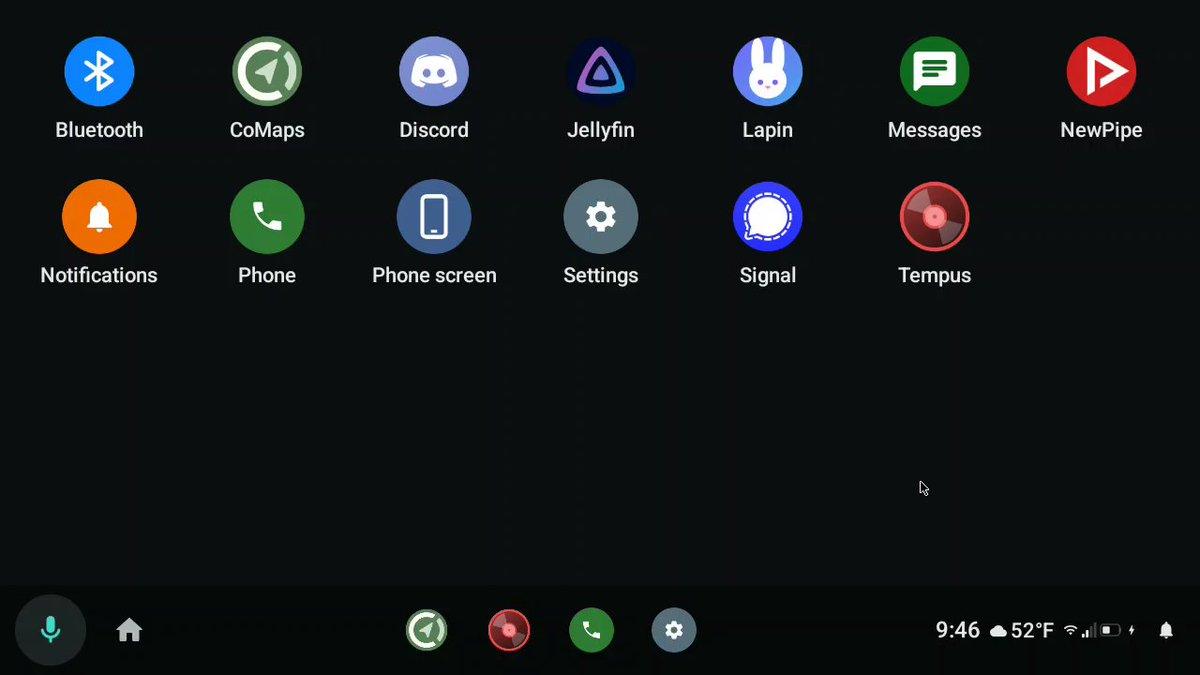
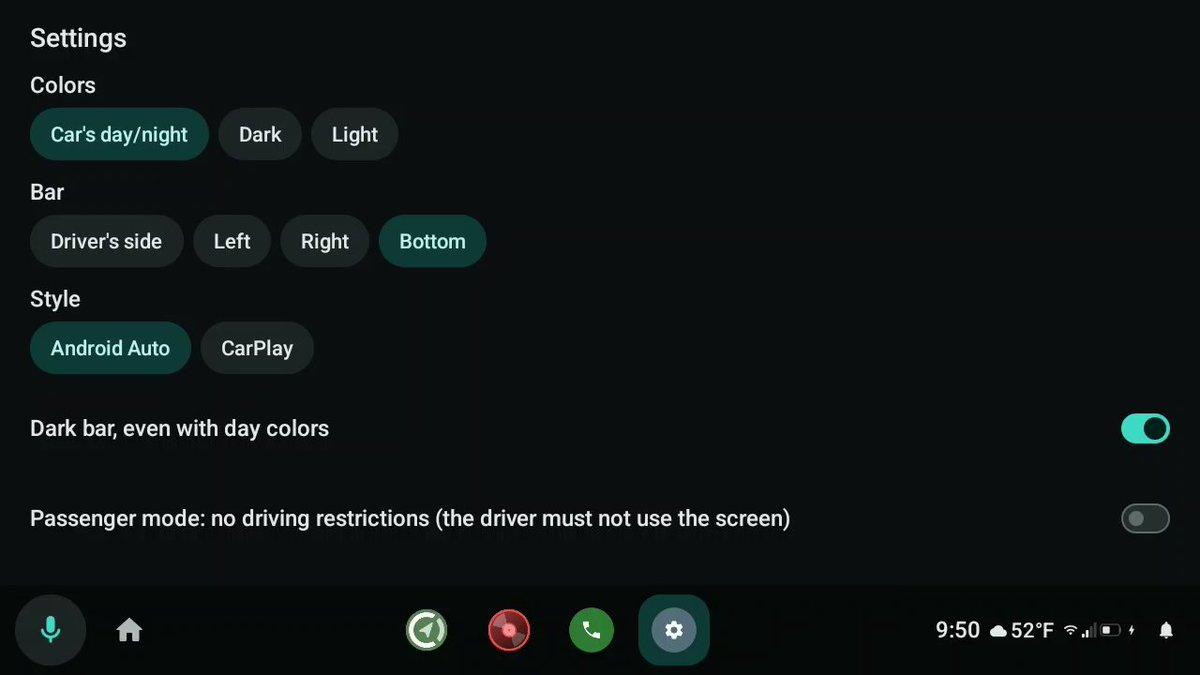
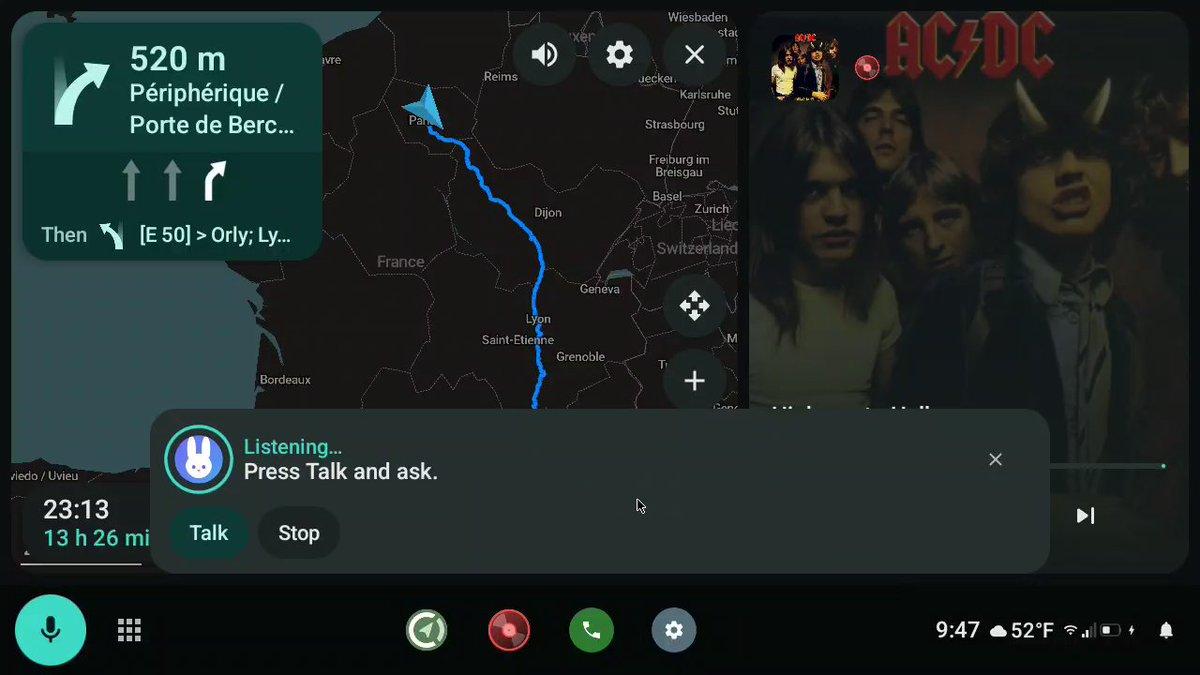
Android Auto without Google Play Services: an open-source alternative worth watching.
AARE is an open-source project aiming to reimplement the smartphone side of Android Auto, allowing apps to appear on your car’s display without relying on Google’s official solution.
Here’s what it offers:
🔹 Navigation with apps like CoMaps and Organic Maps
🔹 Music, podcasts and radio, including support for Navidrome
🔹 Messaging: Signal, WhatsApp and SMS, with message readout and replies while stopped
🔹 An alternative voice assistant
🔹 USB or wireless connectivity
The goal is to give users more freedom in their choice of apps while reducing their dependence on Google’s ecosystem.
One caveat: the project is still at an early stage of development. Compatibility and real-world performance in a car remain to be verified.
https://github.com/prototux/AARE
Would you choose AARE or Gearslip to move away from Android Auto and reduce your dependence on Google?
#Android #OpenSource #DeGoogle #Privacy

![[?]](https://arint.info/system/accounts/avatars/116/093/043/699/009/736/original/6aadb2d82f796a52.png)
RT @MiniMax_AI: Die Gewichte von MiniMax M3.1 Flash sind jetzt öffentlich verfügbar. Insgesamt 428 Milliarden Parameter, davon werden pro Token 23 Milliarden aktiviert.
mehr auf Arint.info
#AgenticAI #KI #M3 #MaschinellesLernen #MiniMax #OpenSource #arint_info
![[?]](https://pxscdn.com/cache/avatars/1917/avatar_ia7xkd6.jpg)
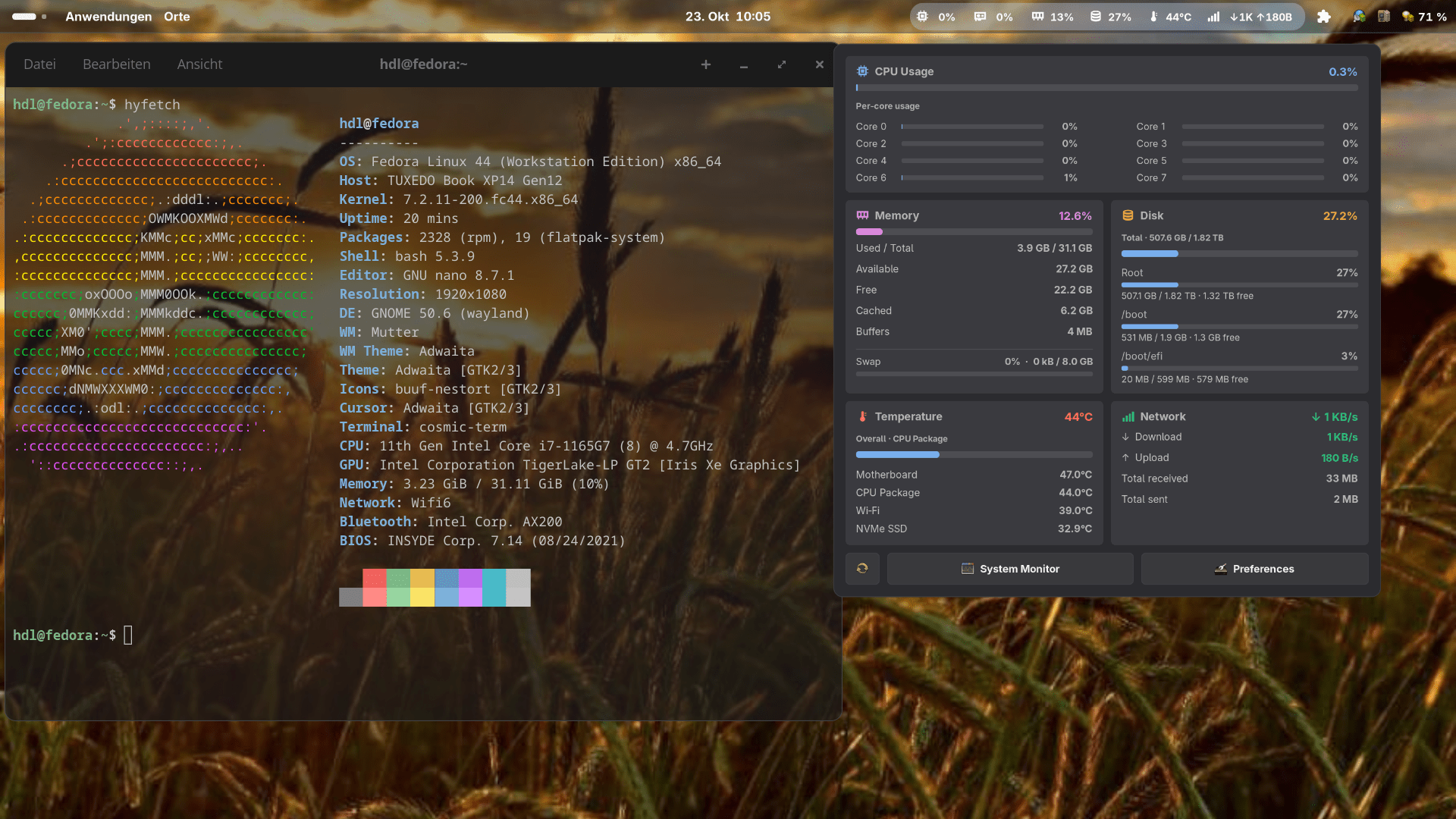
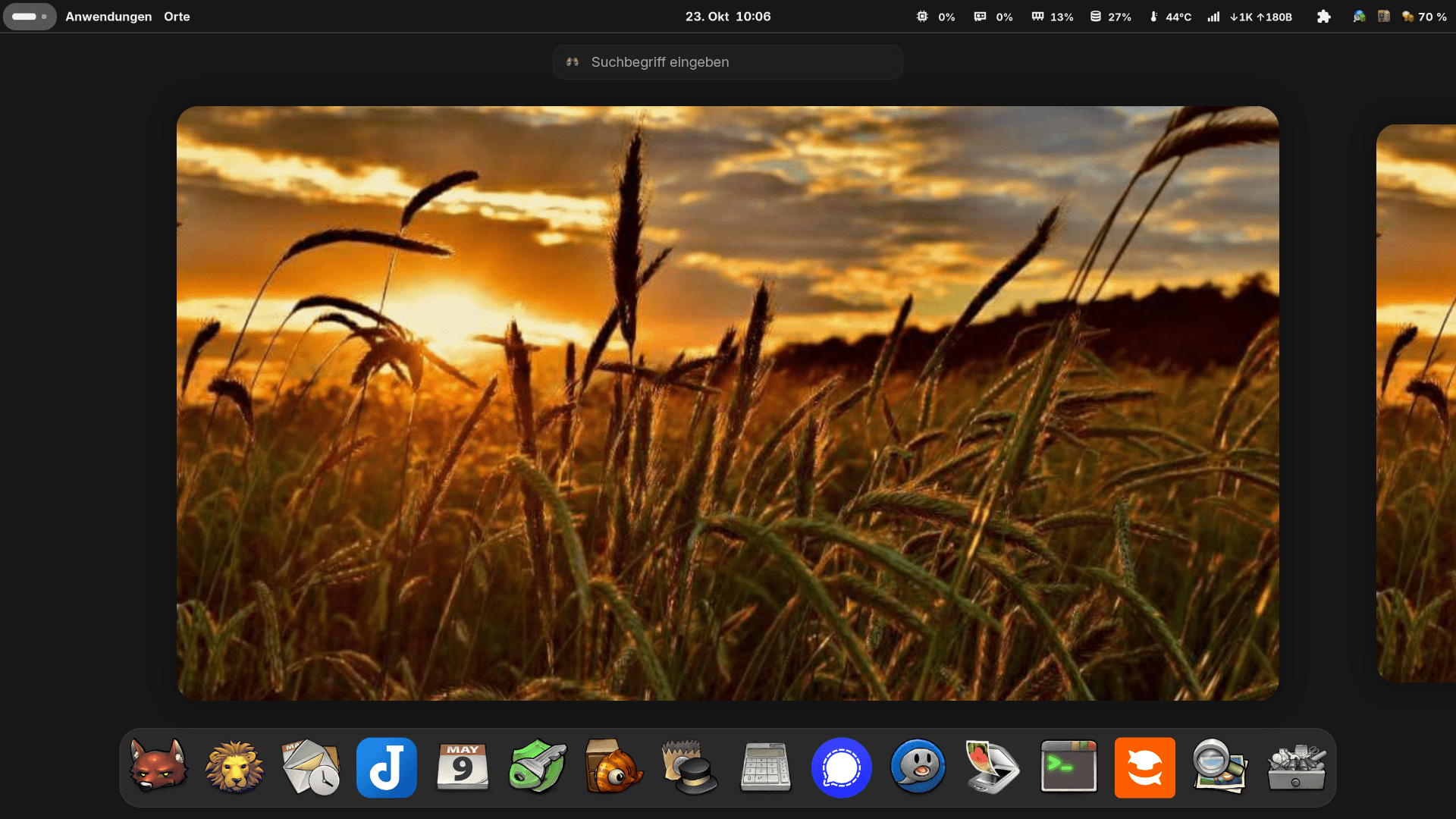
Mein Desktop unter Fedora 44 Gnome 50.4 die Nutzung von Linux und Open Source Software mit entsprechenden Messengern und Mail Anwendungen und ohne Google / Microsoft / Apple und mit KI dann wenn ich sie haben möchte ist und bleibt einfach eine bessere und auch Nachhaltigerer und vor allem Selbst bestimmender Umgang mit Informationstechnologie.
Hintergrund Bild der Hafen von Malmö Schweden
Bild Bearbeitung ist mit den zur Verfügung stehen Tools unter Linux gar kein Problem funzt viel schneller als unter Windows
#darktable #gimp #shotwell
#DailyDesktop
#ShareYourDesktop
#UnixPorn
#mywork
#fedora #gnulinux #Linux #mydesktop #opensource #fedora #libreoffice #fairphone4 #murenacloud #evolution #digitaleselbstbestimmung #onlyoffice #digitaleselbstverteidigung #digitalenachhaltigkeit #signal #telegram #Verschlüsselung #openpgp #rkhunter #lynis
Schwachstellen in Data-Center-Produkten von Atlassian
Eine kritische Sicherheitslücke in mehreren Data-Center-Produkten von Atlassian ermöglicht Angriffe über das Internet.
https://www.linux-magazin.de/news/schwachstellen-in-data-center-produkten-von-atlassian/
#linux #opensource #Atlassian #Security

Alt...
Das Bild zeigt ein Verkehrsschild mit einem Ausrufezeichen in einem Dreieck, das auf eine Warnung hinweist. Der Himmel im Hintergrund ist bewölkt und zeigt eine Mischung aus dunklen und hellen Farben.
![[?]](https://cdn.fosstodon.org/accounts/avatars/109/439/635/636/374/676/original/96f16e650f7fa288.png)
Wishing everyone a great time at Jesień Linuksowa 2026 by Polish Linux Users Group (PLUG), a #hybrid event starting today in Hotel Kolna in #Kraków, #Poland and #online on the Internet
Find out more on
https://foss.events/2026/10-23-jesien-linuksowa-2026.html
Follow the official account: @JesienLinuksowa
Connect via official hashtag(s): #jesienlinuksowa
#foss #floss #freesoftware #opensource #events #europe

Alt...
Logo/Banner of Jesień Linuksowa 2026
![[?]](https://media.troet.cafe/troet/accounts/avatars/109/444/507/789/313/335/original/07863267845bd4cf.png)
Bist du heute Abend in oder um #Bregenz unterwegs und hast noch nichts vor?
Dann schau doch beim Stammtisch der #LUGV vorbei!
Wie immer gilt: alle sind willkommen, Anmeldung nicht nötig. Komm mit deinen Fragen zu #Linux und #OpenSource oder schau einfach auf einen Plausch vorbei.
👉️ https://www.lugv.at/linux-stammtisch-am-23102026-im-gh-goesserbregenz
![[?]](https://horche.demkontinuum.de/photo/profile/hoergen.webp?ts=1792146515)
KeePassXC 2.8.0 bringt Auto-Type unter Wayland - LinuxNews.de
Der exzellente crossplattform Passwortspeicher geht in die nächste Runde
linuxnews.de/keepassxc-2-8-0-b…
#Opensource #Security #Linux #Windows #Mac
Location: Ndjamena
GitHub Package Firewall blockiert schädliche npm-Pakete
GitHub hat die Package Firewall als öffentliche Vorschau für Enterprise-Cloud-Kunden freigegeben. Sie prüft Paketabfragen und Downloads.
#GitHub #IT #OpenSource #Security #Softwareentwicklung #news
![[?]](https://f2.tchncs.de/accounts/avatars/108/289/734/804/555/234/original/a6bcc8412ec0e5f3.png)
Eigentlich fahre ich an der Hochschule keine Updates mehr.
Es sind Rolling Release geworden, obwohl #Debian Stable und #SLES 15/16 es eigentlich nicht sind.
Es vergeht kein Tag ohne das Einspielen von Patches und Securityfixes
Gestern brauchte es eine gesonderte Freigabe des Landes Baden-Württemberg für mehr als 10 Stunden arbeiten.
Personalrat ist auch eingebunden.
Meiner Meinung nach brauchen wir mehr Kollegen, aber das Land hat dafür nicht die Finanzen.
![[?]](https://social.heise.de/__virtual/accounts/avatars/109/722/235/764/766/112/original/9fe14a1a90537b26.png)
TypeScript-Compiler in Rust: Cloudflare übernimmt tsrs
KI-Agenten haben den TypeScript-Compiler nach Rust übersetzt. Microsoft nutzt einige der dabei entdeckten Optimierungen bereits für TypeScript 7.1.
#Compiler #IT #KünstlicheIntelligenz #Microsoft #OpenSource #Rust #TypeScript #news
PlanetFOSS – ein neuer Aggregator für Linux-News
Mit PlanetFOSS hat der ehemalige Redaktionskollege Christoph Langner einen neuen Aggregator für Nachrichten aus der Linux- und Open-Source-Welt geschaffen, der derzeit News aus 172 deutsch- und…
https://www.linux-magazin.de/news/planetfoss-ein-neuer-aggregator-fuer-linux-news/

Alt...
Weißes „LINUX MAGAZIN“-Logo mit orangefarbenem „ONLINE“-Balken auf schwarzem Hintergrund.
![[?]](https://social.heise.de/__virtual/accounts/avatars/109/722/135/333/484/268/original/4c7e67433f6e2701.png)
Linux-Desktop DMS 2.0: Aus DankMaterialShell wird Dux Shell
Die Linux-Desktop-Suite DMS 2.0 „Heisenberg“ für Wayland-Compositors wie Niri kommt in neuem Design und bringt erstmals einen eigenen Dateimanager mit.
![[?]](https://files.mastodon.social/accounts/avatars/114/700/682/245/172/286/original/8fd9138ddaf32277.jpg)
fosstopia: KeePassXC 2.8 ist da: Wayland-Unterstützung, wichtige Sicherheitsfixes uvm
https://fosstopia.de/keepassxc-2-8/
#Linux #opensource
![[?]](https://media.infosec.exchange/infosec.exchange/accounts/avatars/116/392/396/162/876/923/original/118cd3a17bd3317e.png)
Web3 Domains: What They Can Do, How to Get One, and Who They Make Sense For
In the second part of my series on custom domains, I did not recommend Web3 domains for a long-term address.
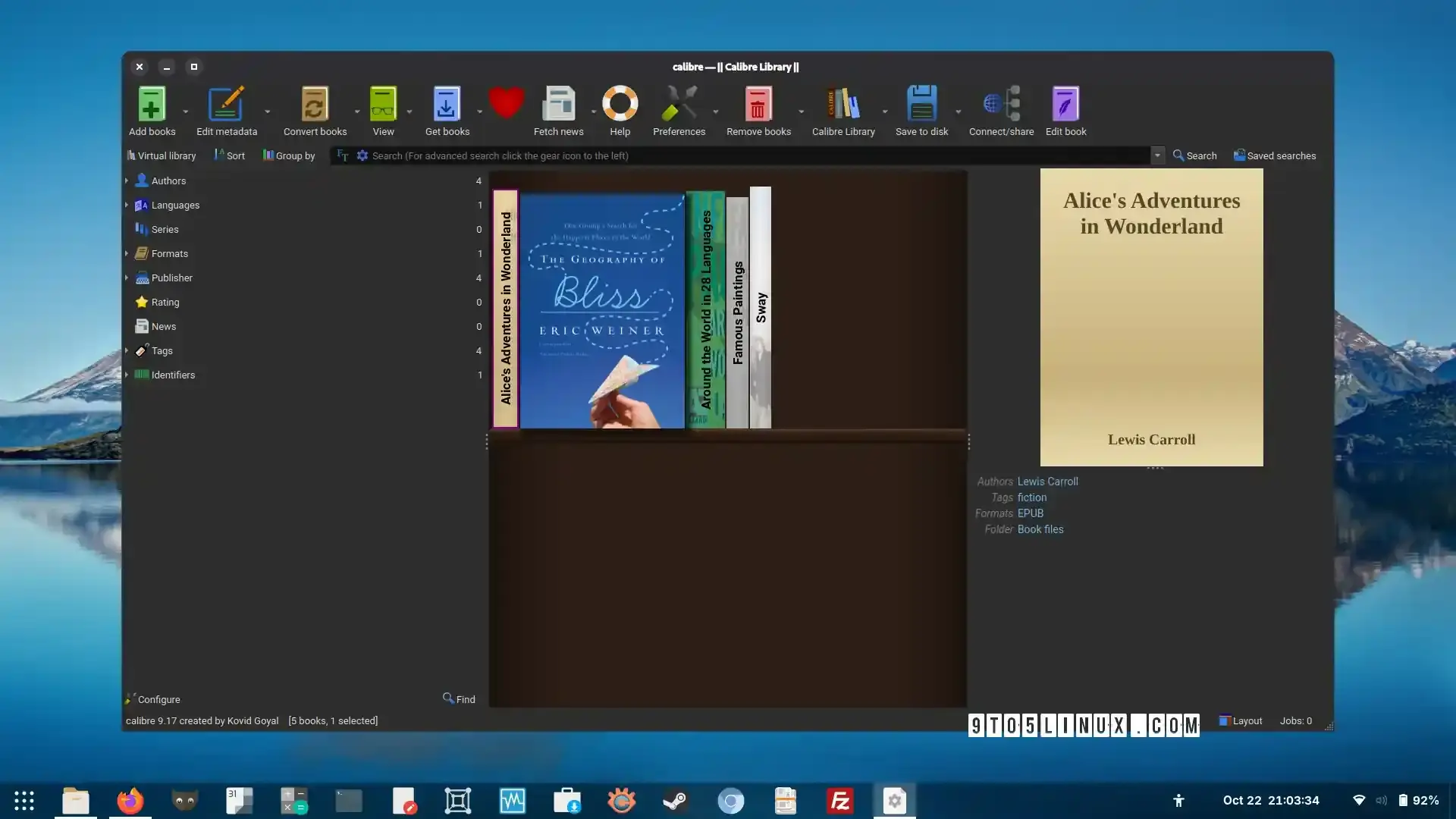
#Calibre 9.17 E-Book Manager Adds JPEG XL Support and Performance Improvements https://9to5linux.com/calibre-9-17-e-book-manager-adds-jpeg-xl-support-and-performance-improvements
#OpenSource #FreeSoftware #Linux #FOSS
Alt...
A screenshot of Calibre 9.17 showing the main window while viewing the local e-book library with the Bookshelf view.
![[?]](https://media.infosec.exchange/infosec.exchange/accounts/avatars/109/429/381/491/877/380/original/560ac6d98e44a7bc.jpg)
ICS[AP] updated CISA ICS Advisories Master File for 10/22/2026 & the following year's CSVs:
CISA_ICS_ADV_2026_10_22_26.csv
Available @ ICS[AP] GitHub:
https://github.com/icsadvprj/ICS-Advisory-Project/tree/main
![[?]](https://cdn.masto.host/rubysocial/accounts/avatars/000/001/460/original/abbbe5a56e5f1261.jpeg)
First YouTube video in 3 years just dropped!
Join me for a glorious 1 hour 16 minutes while I live-code a contribution to Rust's Clippy. All without Agents or LLMs.
![[?]](https://media.infosec.exchange/infosec.exchange/accounts/avatars/113/247/756/313/164/165/original/70ea71b3dff2cf65.jpg)

The Signal Protocol in Rust
TL;DR: I have open-sourced a #Rust implementation of the #SignalProtocol that compiles to #WASM for #Browser-based #P2P messaging, overcoming the #Nodejs limitations of the official library.
I am sharing my implementation of the Signal Protocol designed specifically for the #Frontend. While the official libsignal is the gold standard, its #JavaScript targets are often optimized for Node.js, which creates integration challenges for client-side web applications.
My version is built in #RustLang and compiles to #WebAssembly, utilizing #ModuleFederation to provide robust #Encryption for decentralized environments. It currently powers the end-to-end security for my series of #P2P messaging projects.
Protocol Demo:
https://signal.positive-intentions.com/
P2P Messaging roadmap:
https://glitr.io/docs/technical/roadmap
I am looking for feedback from the #Dev and #Infosec community. If you have experience with #Cryptography audits or formal-proof verification, I would appreciate your eyes on the codebase as I work toward a more finished state.
GitHub Repository:
https://github.com/positive-intentions/signal-protocol
#Signal #SignalProtocol #Rust #RustLang #WASM #WebAssembly #OpenSource #OSS #Privacy #Encryption #E2EE #WebDev #Frontend #BrowserTech #Decentralized #WebApps #Coding #Security #SoftwareEngineering #Networking #PeerToPeer #P2P #Cryptography #Audit #CyberSecurity #Tech #JavaScript #Programming #ModuleFederation #P2PWeb #PrivacyTech #SecureMessaging #WebPerf #TechCommunity #InfoSec #WebSecurity

Alt...
signal protocol
![[?]](https://files.mastodon.social/accounts/avatars/114/048/194/944/023/530/original/3a6b93b37c67427d.png)
Uberblok – an interactive museum of ZFS internals
https://uberblok.storagebits.workers.dev/
Comments: https://news.ycombinator.com/item?id=50180257
#HackerNews #Uberblok #ZFS #InteractiveMuseum #StorageTech #OpenSource #TechInnovation
![[?]](https://files.mastodon.social/accounts/avatars/117/208/576/587/344/856/original/d619cad01752107b.png)
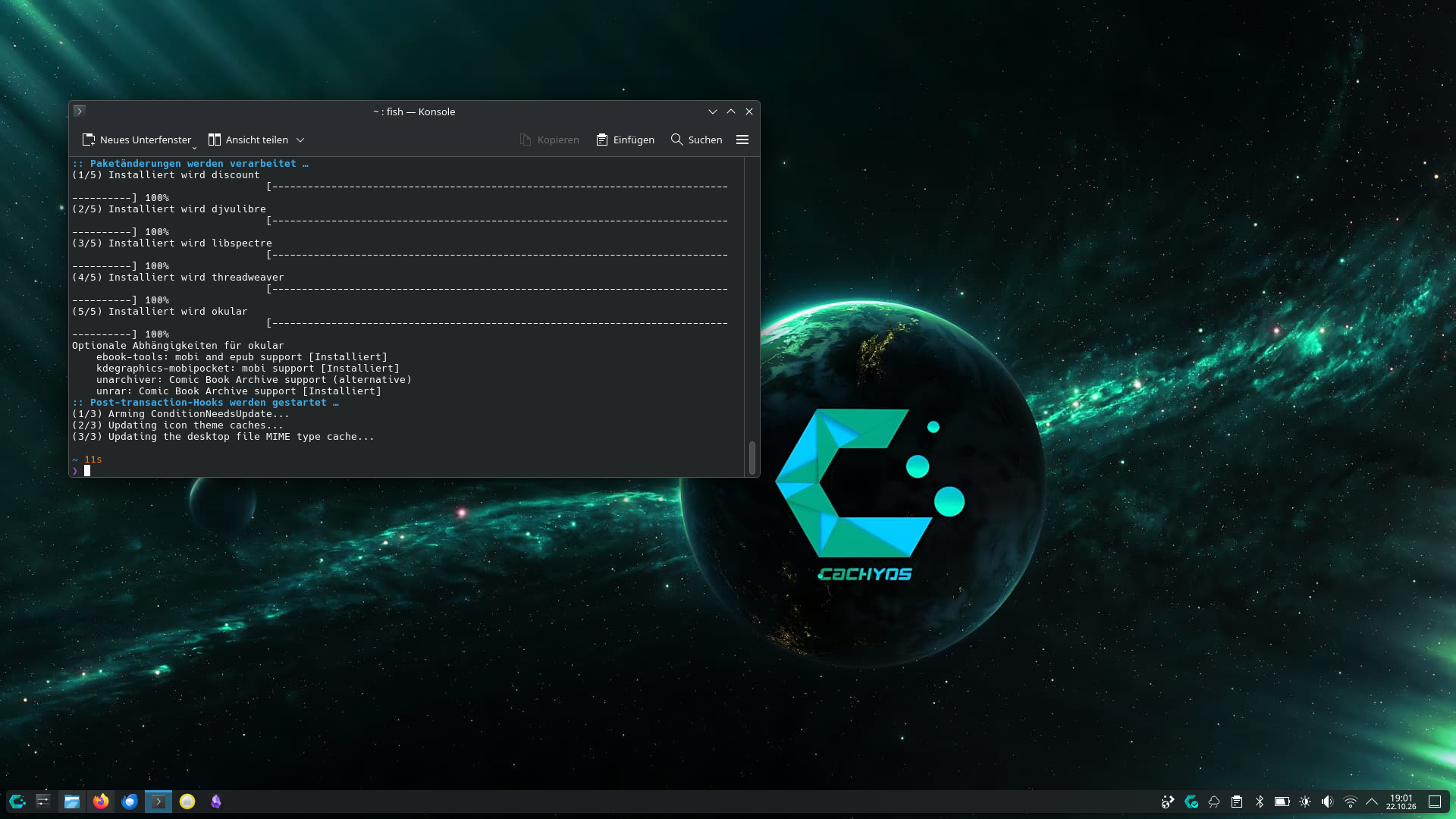
CachyOS, erstes, bewusst vorsichtiges Fazit nach ein paar Tagen nach dem Wechsel von Mint.
Bisher: richtig gut!
Das System fühlt sich sehr schnell an. Mein WLAN-Chip, der unter Mint immer wieder gezickt hat, läuft ruhig und ohne Probleme, das Handling ist angenehm und entspannt.
Im Terminal muss ich mich noch an die Cachy-igen Eigenheiten gewöhnen. Aber wozu hat man schließlich PostIt`s
Ees ist ein erster Eindruck, der Alltagstest geht weiter.
#CachyOS #Linux #LinuxMint #OpenSource
![[?]](https://cdn.masto.host/floss/accounts/avatars/000/058/894/original/79f2a195ed144037.jpg)
KeePassXC 2.8.0 is out.
The update finishes off the port to Qt6, and adds Quick Unlock, AppImage buffs and long-awaited support for auto-type on Wayland.
https://www.omgubuntu.co.uk/2026/10/keepassxc-2-8-auto-type-wayland?v1
![[?]](https://media.infosec.exchange/infosec.exchange/accounts/avatars/111/794/732/819/301/361/original/0d23cdbcde72f0f3.png)
Bruno (open-source Postman alternative) in v4.3.0 released
Opengrep (open-source Semgrep alternative) in v1.32.0 released
RT @ns123abc: EILMELDUNG: DeepSeek hat 15 Milliarden US-Dollar aufgenommen, um massiv Rechenzentren aufzubauen und Open-Source-Modelle zu entwickeln. Der CEO betrat Investor-Treffen in Hangzhou und sagte: „Wir brauchen 7 Milliarden Dollar.“ Die Investoren begannen zu schwitzen, woraufhin die Summe auf 11 Milliarden Dollar erhöht wurde. Tencent nickte sofort und einigte sich auf 15 Milliarden Dollar.
mehr auf Arint.info
#DeepSeek #Hangzhou #Investitionen #KünstlicheIntelligenz #OpenSource #TechNews #arint_info
Passwortmanager ohne Cloud-Zwang: Update für KeePassXC
KeePassXC 2.8.0 schließt Sicherheitslücken, unterstützt Auto-Type unter Wayland und ermöglicht den Datenbankabgleich über externe Programme.
#IT #Linux #macOS #OpenSource #Passwörter #Security #Wayland #Windows #news
Kritische PHP-Lücke bedroht viele Webseiten
Am 21. Oktober 2026 wurden zwei kritische Sicherheitslücken im Kern der Programmiersprache PHP veröffentlich.
https://www.linux-magazin.de/news/kritische-php-luecke-bedroht-viele-webseiten/

Alt...
Das Bild zeigt ein Verkehrsschild mit einem Ausrufezeichen in einem Dreieck, das auf eine Warnung hinweist. Der Himmel im Hintergrund ist bewölkt und zeigt eine Mischung aus dunklen und hellen Farben.
![[?]](https://media.phpc.social/accounts/avatars/000/000/948/original/b2c0fbf19043d758.jpg)
![[?]](https://cdn.masto.host/socialnlnetlabsnl/accounts/avatars/114/692/612/288/811/644/original/64cfb2c181f5af61.png)
🚨 Security update: Unbound 1.26.2 is now available.
This release consolidates security fixes for issues reported over a period of time. There are fixes for CVE-2026-35501, CVE-2026-50106, CVE-2026-96405, CVE-2026-97206 and CVE-2026-109125.
https://community.nlnetlabs.nl/t/unbound-1-26-2-released/3495
![[?]](https://s3.eu-central-2.wasabisys.com/mastodonworld/accounts/avatars/109/303/297/035/031/718/original/3633addf721e313c.png)
A critical flaw affecting 70% of all websites has the cybersecurity world panicked
#Tech #Cybersecurity #PHP #PHP2Shell #WordPress #World #DataSecurity #Hacking #AI #TechNews #ArtificialIntelligence #WebSecurity #OpenSource
#The14Media
https://the-14.com/a-critical-flaw-affecting-70-of-all-websites-has-the-cybersecurity-world-panicked/
![[?]](https://social.lukasrotermund.de/fileserver/01XW0HZH4GB4MREV8E484TYKAY/attachment/original/01M1191A8PKFFV7PVTHCEB44NG.png)
Are you a FLOSS maintainer? What does the current state of LLMs do to you, personally? Does it help you? Does it give your sleepless nights? How do you feel about companies using your code to train their models?
I'm looking for some (quotable) feelings for a slide for my hackumenta talk (CCC) - Agent leck Aier (Agent lick b**ls), the influence of LLMs on our society.
Edit: And tell me if its OK to attach your name and a link to your comment :) - default: anonymous quote
Pls boost or tag a maintainer (who is OK with being tagged).
![[?]](https://cdn.masto.host/indiewebsocial/accounts/avatars/000/000/002/original/5de753df6fe336d5.png)
I agree with every idea @samvie advocates for here.
A European digital sovereignty movement that is all based on close source European owned solutions vs American tech is not the solution. That’s trading one dependency for another.
The solution is open protocols and offerings not owned by any single company. #opensocialweb #opensource #ooenprotocol
PwnEscape: Lücke im Linux-Kernel
Der Sicherheitsforscher Paulos Yibelo hat eine Sicherheitslücke im Linux-Kernel aufgespürt, die im KVM-Modul des Kernels steckt. Yibelo hat das Problem mit Hilfe von KI aufgespürt.
https://www.linux-magazin.de/news/pwnescape-luecke-im-linux-kernel/
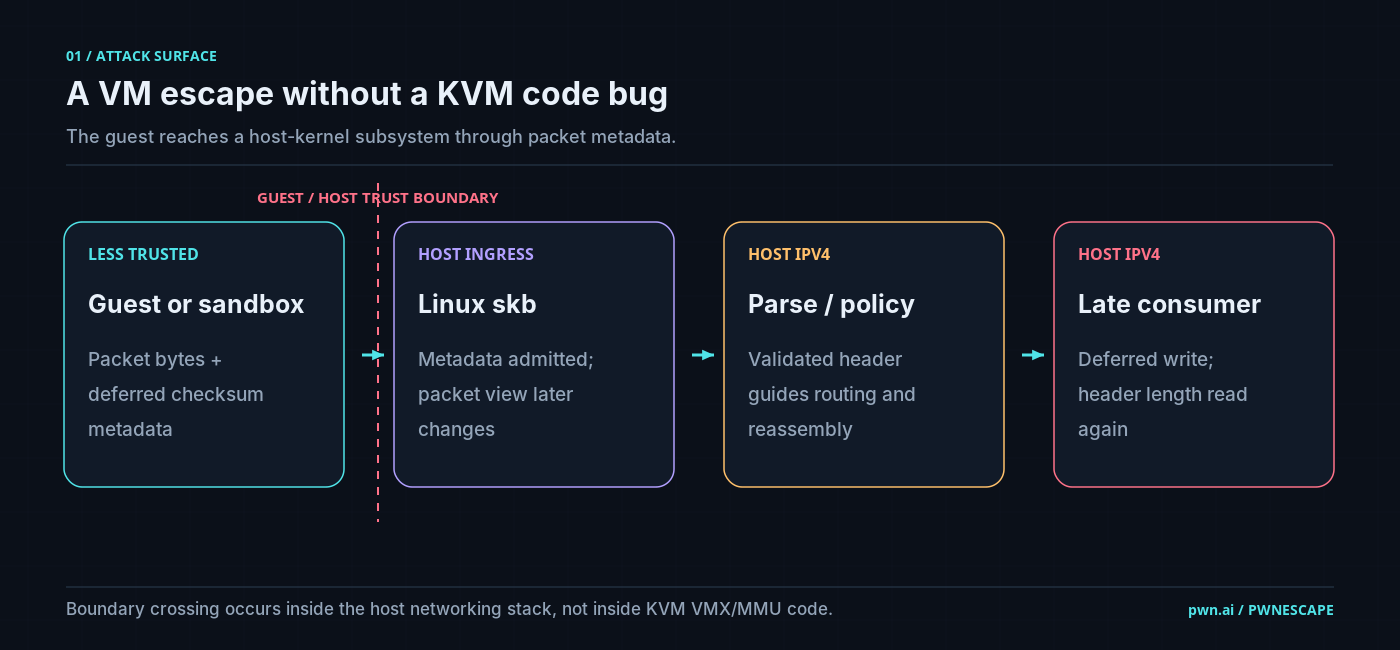
Alt...
Das Bild zeigt eine technische Grafik mit dem Titel "A VM escape without a KVM code bug". Es enthält vier Hauptbereiche: "GUEST / HOST TRUST BOUNDARY", "HOST INGRESS", "HOST IPV4" und "HOST IPV4". In "GUEST / HOST TRUST BOUNDARY" steht "Less Trusted" mit "Guest or sandbox" darunter.
BSI findet Mängel in Kinder-Smartwatches
Kinder-Smartwatches versprechen Eltern Sicherheit und ermöglichen Kindern erste Schritte in die digitale Welt.
https://www.linux-magazin.de/news/bsi-findet-maengel-in-kinder-smartwatches/
#linux #opensource #BSI #Kinderschutz #Smartwatch
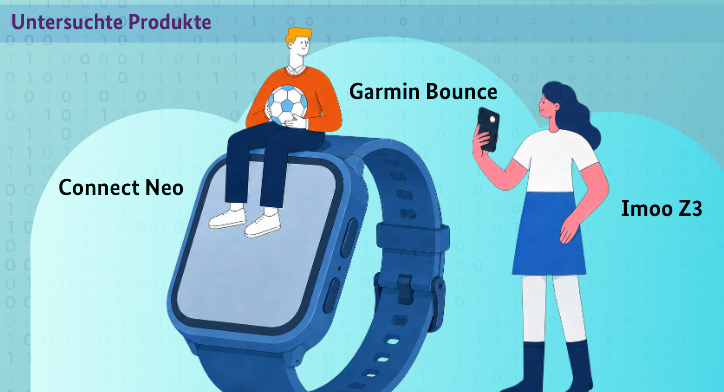
Alt...
Das Bild zeigt eine Illustration mit einem großen, blauen Smartwatch-Display, auf dem verschiedene Produkte wie "Connect Neo", "Garmin Bounce" und "Imoo Z3" beschriftet sind. Links sitzt ein Mann mit einem Fußball auf dem Display, rechts steht eine Frau mit einem Smartphone.
Multipass 1.17.0 unterstützt nicht mehr nur Ubuntu
Der „leichtgewichtige VM-Manager“ von Canonical fährt mit einem knackigen Befehl ein komplettes Ubuntu hoch. Die neue Version kann das endlich auch mit Debian und Fedora.
https://www.linux-magazin.de/news/multipass-1-17-0-unterstuetzt-nicht-mehr-nur-ubuntu/
#linux #opensource #Canonical #Multipass #Ubuntu #Virtualisisung

Alt...
Das Bild zeigt eine Grafik mit einem Pinguin, der das Logo von Linux darstellt. Der Pinguin hat eine typische Linux-Design-Ästhetik mit einem schwarzen Körper, einem weißen Bauch und gelben Füßen.
![[?]](https://assets.drupal.community/accounts/avatars/109/631/241/216/917/308/original/4c51d6bdd1f3a65b.png)
We just removed most third-party embeds and tracking scripts from DrupalEasy.com, including Google Analytics, EventBrite, Mailchimp, and embedded social posts.
We tell clients to own their data and limit tracking, so we decided to practice what we preach. Our Klaro and Security Kit setups got a refresh along the way.
Read why and how-to: https://www.drupaleasy.com/blogs/ultimike/2026/10/removing-most-embeds-and-tracking-scripts-drupaleasycom-we-dont-control
![[?]](https://files.mastodon.social/accounts/avatars/110/644/335/331/459/995/original/2cc8b6c6f24349c0.jpeg)
Meine Spyware ist da 👀 🦇
Als Linuxuserin muss man echt kreativ werden, wenn man sich mit Fledermaus-Akustik befassen will. Die gängigen Tools sind fürs #Ehrenamt entweder gnadenlos zu teuer oder funktionieren nur auf Win/mac - schlimmstenfalls beides. Ich werde also in den nächsten Tagendie AudioMoth und AudioMoth USB testen, auch wenn die Fledis größtenteils schon in den Winterquartieren sind.
#Fledermäuse #Fledermausschutz #Naturschutz #Artenschutz #Flediverse #Linux #opensource #AudioMoth
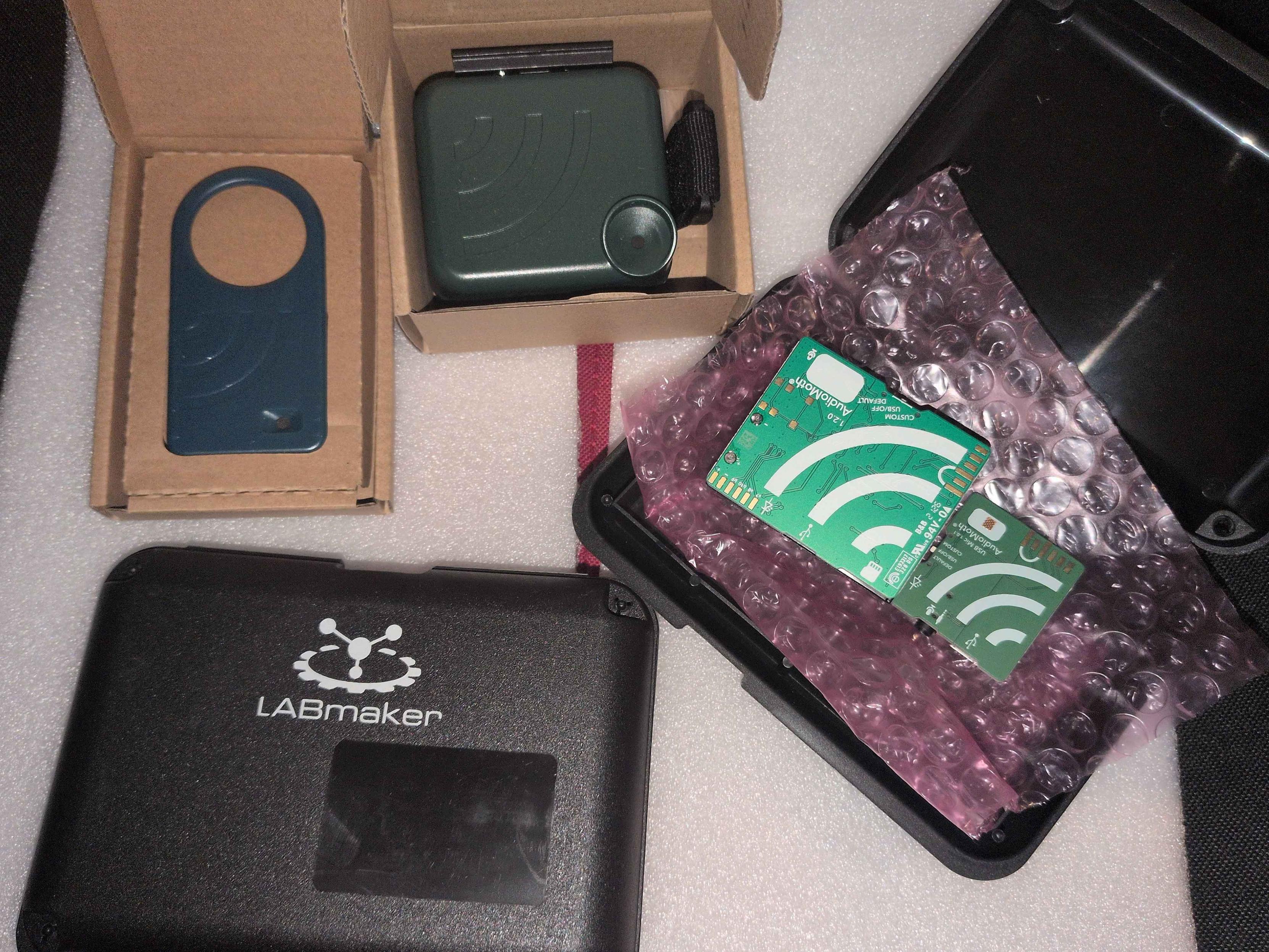
Alt...
Foto meiner technischen Bestellung: zwei Platinen mit Spezialmikrofonen in einer geöffneten schwarzen Transportschachtel, die passenden Gehäuse in Pappkartons und eine weitere geschlossene Transportschachtel mit der Aufschrift "LABmaker".
![[?]](https://media.infosec.exchange/infosec.exchange/accounts/avatars/114/227/755/996/640/989/original/d6c1c5fbb389d991.png)

Security Advisory: CVE-2025-71438 - Out-of-Bounds Read in GPAC/MP4Box
Processing a crafted AC-4 stream with an invalid `frame_rate_index` triggers an out-of-bounds read in `gf_odf_ac4_cfg_dsi_v1`, causing MP4Box to crash.
Summary:
The `gf_odf_ac4_cfg_dsi_v1` function in `odf/descriptors.c` uses a stream-supplied `frame_rate_index` to index into fixed-size lookup tables (`AC4_SAMPLE_DELTA_TABLE_48`, `AC4_MEDIA_TIMESCALE_48`). The function does not validate that the index is within bounds before performing the table lookup. A crafted AC-4 file carrying an out-of-range index (e.g., 15) causes an out-of-bounds read, ultimately resulting in a NULL dereference and process crash.
CWE:
CWE-125 - Out-of-bounds Read
Affected Component:
```
odf/descriptors.c:2179
Function: gf_odf_ac4_cfg_dsi_v1()
```
Affected Product:
MP4Box (GPAC Multimedia Open Source Project)
Affected Version:
2.5-DEV-rev1617-g856674b22-master; commit `856674b226d6cbe28a941ad223be38194cbf7d37`. Any codebase equivalent to this commit that has not applied the fix commit is affected.
Attack Conditions:
An attacker supplies a specially crafted AC-4 stream file containing an invalid `frame_rate_index` value. Local access is required; the victim must invoke `MP4Box -dash 100 <crafted_file>` or any equivalent DASH segmentation command that triggers the AC-4 configuration descriptor parsing path.
Impact:
The out-of-bounds read leads to an immediate process crash (SEGV READ at address 0x000000000000), resulting in Denial of Service. No evidence of arbitrary code execution was observed.
Fix / mitigation status:
The issue was fixed in GPAC commit:
```
13eb5b76560aaf7813b865a2ad433258478e2695
```
Users should update to a GPAC build containing this commit or later.
References:
- Issue: https://github.com/gpac/gpac/issues/3303
- PoC: https://github.com/sigdevel/pocs/blob/main/res/gpac/MP4Box/50/50_gf_odf_ac4_cfg_dsi_v1_odf_descriptors_c_2179
- Fix: https://github.com/gpac/gpac/commit/13eb5b76560aaf7813b865a2ad433258478e2695
Credit
Alexander A. Shvedov (@sigdevel)
#fuzzing #infosec #security #afl++ #revers #cybersecurity #bugbounty #vulnerability #opensource #linux #cve #advisory #gpac
Wenn Behörden Software teilen: Die Gewinner des Open-Source-Wettbewerbs
Der Open-Source-Wettbewerb für die öffentliche Verwaltung ist entschieden. XMAS, F13, KoliBri und BaKIM gewinnen Hauptpreise.
#DigitaleSouveränität #IT #KünstlicheIntelligenz #Netzpolitik #OpenSource #Wirtschaft #news
Open Source Wettbewerb würdigt digital souveräne Projekte in öffentlichen Verwaltungen
Am 15. Oktober 2026 fand auf der Smart Country Convention in Berlin die Preisverleihung für den Open Source Wettbewerb für Behörden und öffentliche Institutionen statt.
#linux #opensource #Community #DigitaleSouveränität #OpenSourceBusinessAlliance #OpenSourceSoftware

Alt...
Die Bildschirmaufnahme zeigt eine Reihe von transparenten Trophäen mit farbigen Logos und Texten. Die Trophäen sind auf einem Podest mit der Aufschrift "SMART COUNTRY CONVENTION" platziert.
Gnome OS Preview zum Ausprobieren
Vor zwei Jahren hat sich Gnome entschlossen, aus Gnome OS ein Allzweck-Betriebssystem für Endnutzer zu entwickeln.
https://www.linux-magazin.de/news/gnome-os-preview-zum-ausprobieren/
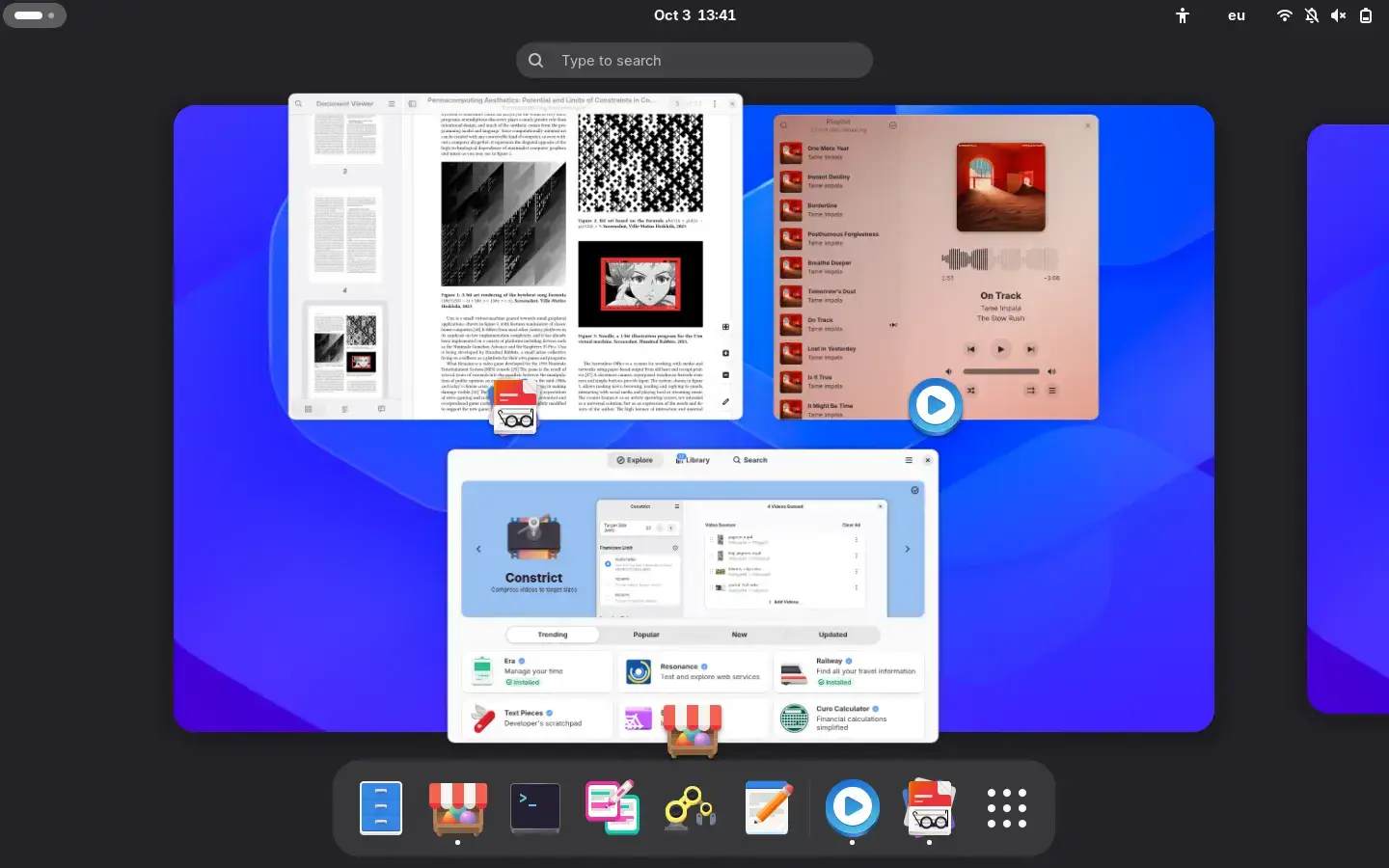
Alt...
Das Bild zeigt eine Benutzeroberfläche mit verschiedenen Anwendungen und Icons. Auf der linken Seite ist ein Dokument Viewer mit einer Seite mit Text und einem Bild zu sehen. Rechts daneben ist ein Musikplayer mit einer Ladeanzeige und einem Titel.
Deutsche Office-Suite openDesk von Nachfrage überrumpelt
Über die Nachfrage nach seiner Microsoft-Office-Alternative openDesk kann sich das ZenDiS nicht beschweren – muss aber das Geschäftsmodell umstellen.
https://www.linux-magazin.de/news/opendesk-von-nachfrage-ueberrumpelt/
#linux #opensource #DigitaleSouveränität #OfficeSuite #OpenDesk #Zendis
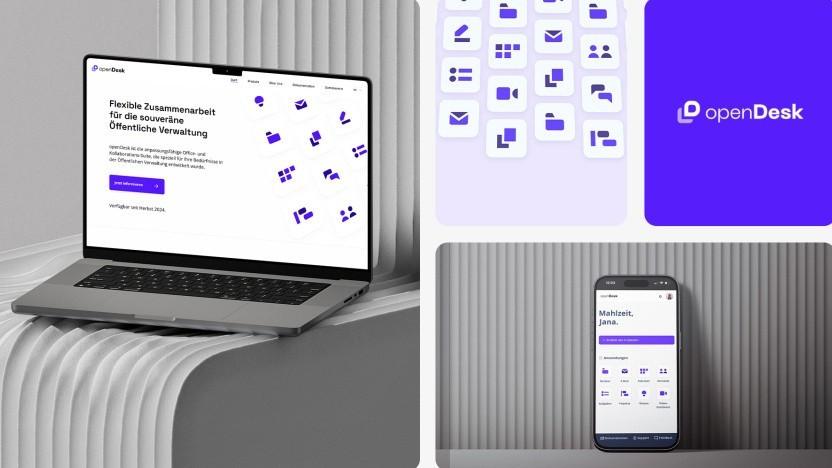
Alt...
Ein Laptop mit der Anzeige von "openDesk" und der Überschrift "Flexible Zusammenarbeit für die souveräne Öffentliche Verwaltung". Rechts daneben sind Symbole für E-Mail, Chat und andere Tools. Unten ist ein Smartphone mit einer Chat-App geöffnet.
![[?]](https://littleone.littlefedi.social/media/01a10547-e616-799e-9e19-6a053dba35d9/image.png)
For everyone using Windows:
"I caught my Windows apps phoning home with this free open-source firewall"
https://www.howtogeek.com/caught-my-windows-apps-phoning-home-with-this-free-open-source-firewall/
![[?]](https://media.phpc.social/accounts/avatars/117/474/536/587/891/434/original/f9402745bb120dd8.png)
Anton Medvedev, who created Deployer, put a whole SQL database in one PHP file. No Composer, no dependencies.
https://phplives.dev/entries/elephpantdb/
PHP lives! 🔥
![[?]](https://cdn.fosstodon.org/accounts/avatars/000/110/553/original/37157bcdf75a784c.png)
A recap of the #LibreOffice Conference 2026, which took place in September in Pordenone, northern Italy. Thanks to the local team for organising the event! https://www.youtube.com/watch?v=C-AZY8H5mn4 #foss #opensource #freesoftware
Open Productivity: Open-Source-Spezialisten gründen Firma für openDesk
Sechs Hersteller von Open-Source-Software haben die Open Productivity Software GmbH gegründet. Das teilte das neue Unternehmen Open Productivity in Berlin mit.
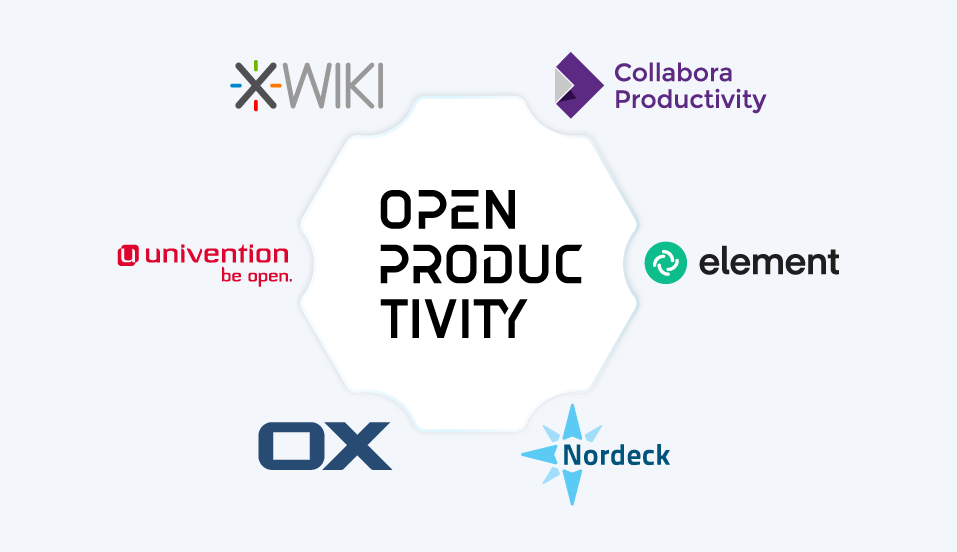
Alt...
Das Bild zeigt eine Grafik mit Logos und Text. Links oben ist das Logo von XWiki, rechts oben das von Collabora Productivity. In der Mitte steht "OPEN PRODUCTIVITY". Links von "OPEN PRODUCTIVITY" ist das Logo von univention mit dem Text "be open".
![[?]](https://files.mastodon.social/accounts/avatars/111/771/667/167/911/653/original/24ca25a73b4130d0.png)
In 11 Tagen ist wieder #Diday 🥳
Ich habe mich größtenteils von Big Tech verabschiedet. Der größte Schritt war dabei der Umstieg auf #Linux – oder doch nicht?
https://krisu.eu/posts/linux/
Zu junge Pakete müssen draußen bleiben: Rust schützt die Lieferkette
Mehr Sicherheit für die Lieferkette: Das Rust-Projekt lässt Entwickler optional auf die Cargo-Bremse treten. Zu junge Pakete weist Cargo ab.
![[?]](https://fedi.at/system/accounts/avatars/117/383/761/425/356/052/original/f1c7b99f908d5b17.png)
Guten Morgen
CachyOS Settings ist kein Fenster und kein Programm zum Anklicken. Der Name führt in die Irre. Es ist eine Sammlung von Voreinstellungen, die bei der Installation mitkommt und beim Hochfahren greift. Sie liegen verteilt unter /usr/lib und /etc, im Alltag bekommst du sie fast nie zu sehen.
Ein großer Teil betrifft den Arbeitsspeicher. CachyOS legt einen komprimierten Auslagerungsbereich im RAM an, ungefähr so groß wie der verbaute Speicher. Wird es eng, packt der Kernel die Daten mit zstd zusammen, statt sie sofort auf die Festplatte zu schreiben. Dieser Bereich wird vor einer Partition auf der Platte genutzt. Dazu kommen eine hohe Neigung, ihn früh zu füllen, und Werte für den Dateicache und das Zurückschreiben auf das Laufwerk. Auf schwachen Geräten fällt das stärker auf als auf großen.
Auch bei den Startzeiten wird nachgeholfen. Dienste bekommen kürzere Fristen, damit ein hängender Prozess nicht minutenlang blockiert. Das Systemprotokoll darf höchstens 50 MB groß werden, Absturzabbilder verschwinden nach drei Tagen, und die Zahl gleichzeitig offener Dateien wird angehoben. So sammelt sich über Monate kein Ballast an.
Dann sind da noch viele kleine Regeln für den Alltag. Eine Prioritätshilfe gibt Anwendungen je nach Aufgabe eine passende Priorität, udev wählt passend zum Laufwerkstyp eine Warteschlange für das Lesen und Schreiben, die Audioenergiesparfunktion bleibt am Netzteil aus, damit der Ton nicht knackt, und die Zeit synchronisiert sich über Cloudflare. Dazu kommen Vorgaben für Touchpad, DNS, WLAN und Grafiktreiber.
Der Gedanke dahinter ist ein Rechner, der nach der Installation ohne Nacharbeit läuft, auch für Spiele und Multimedia. Zaubern kann das nicht, es sind viele einzelne Entscheidungen, die dir jemand vorher abgenommen hat. Ändern kannst du sie trotzdem, am besten mit eigenen Dateien unter /etc, damit ein Update die Anpassung nicht überschreibt.
Welche Grundeinstellung hat dich bei deiner Distribution schon einmal überrascht?
![[?]](https://media.phpc.social/accounts/avatars/113/963/544/719/681/126/original/31060ae71cd41389.jpeg)
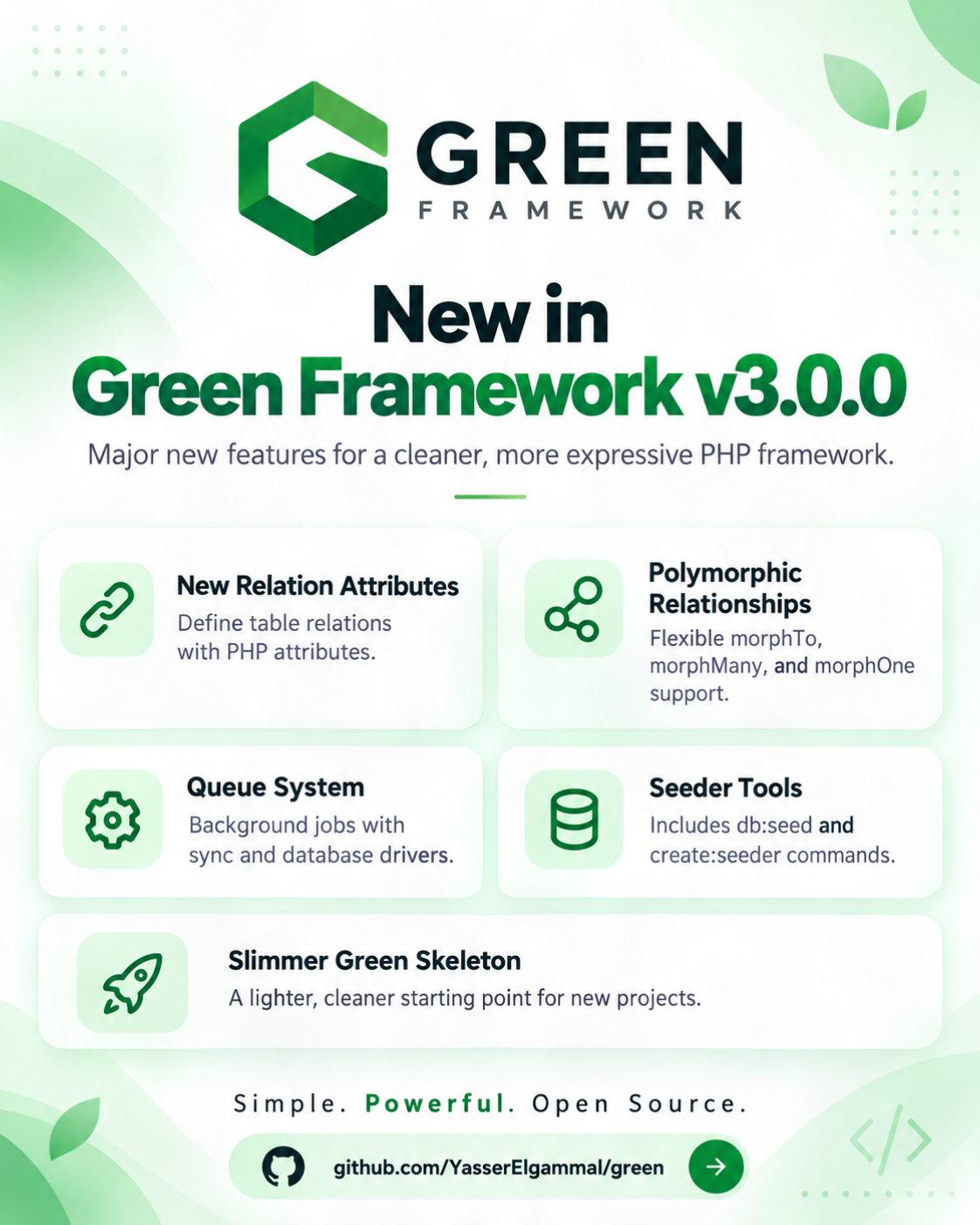
What’s New in Green Framework v3.0.0:
- New Relation Attributes
- Polymorphic Relationships
- Queue System
- Database Seeders:
- Slimmer Green Skeleton
Still building. 🌱
#PHP #GreenFramework #OpenSource #BackendDevelopment #SoftwareArchitecture
Alt...
Green Framework
![[?]](https://media.infosec.exchange/infosec.exchange/accounts/avatars/111/779/086/535/133/896/original/0d2026fae4c5dace.png) TechnoTenshi (open for work)
TechnoTenshi (open for work) 
 [She/Her] » 🌐
@technotenshi@infosec.exchange
The PHP Foundation says first signs of the flaw behind CVE-2026-109618 appeared in 2024, and the fix then stalled for months: "a structural failure." PHP 8.5.12, 8.4.27, 8.3.36 and 8.2.35 fix it and CVE-2026-109619, both unauthenticated RCE (CVSS 9.2). It says Chainguard broke the embargo 6+ hours early; Chainguard's CEO told The Register he shipped because vendors reported exploitation. AWS saw a honeypot attempt on Oct 17.
![[?]](https://media.infosec.exchange/infosec.exchange/accounts/avatars/117/440/641/290/445/826/original/b20894f3ef2c4292.png)
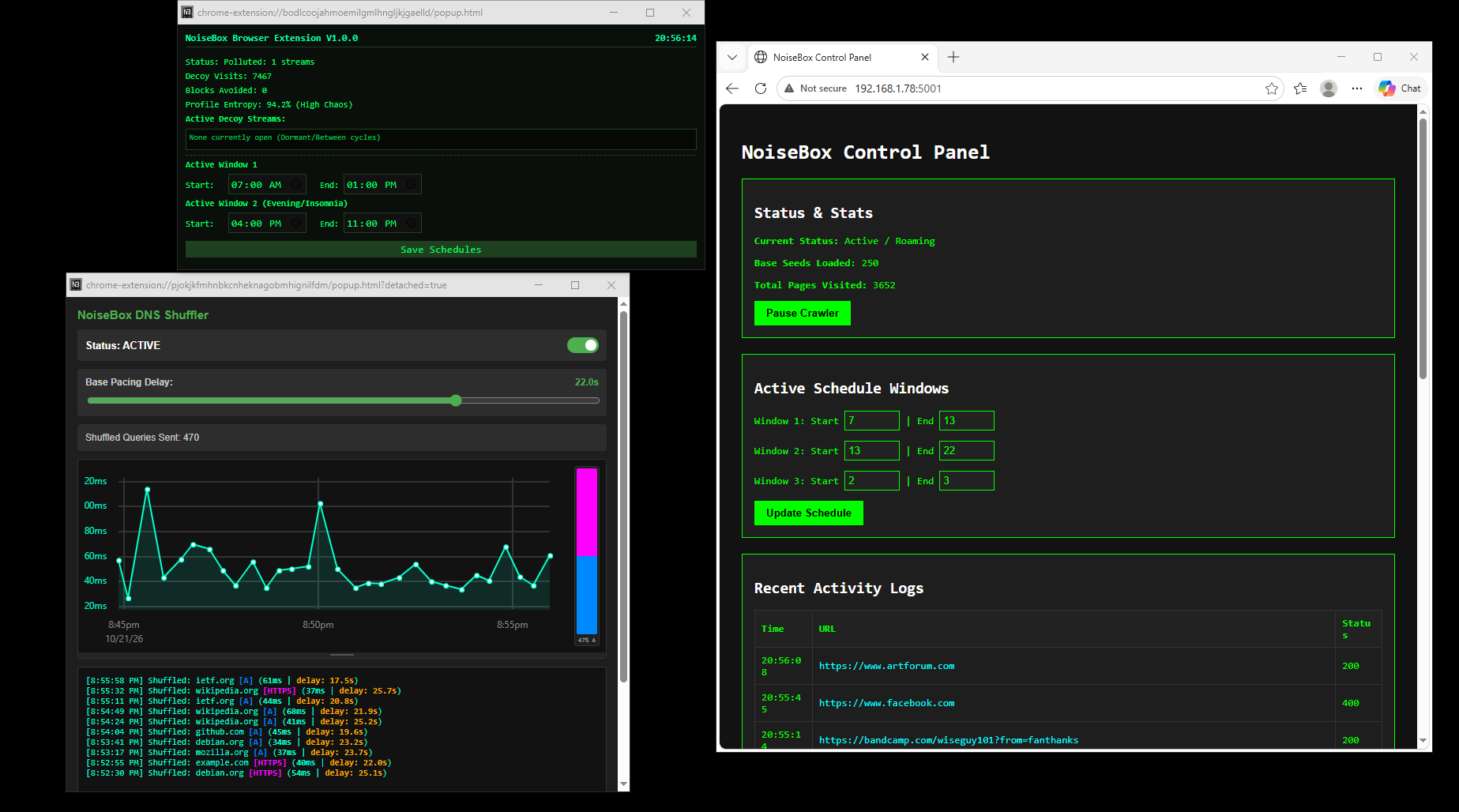
A screen full of data poison! Clockwise from top: NoiseBox Chrome Based Crawler Extension, NoiseBox router-level Wyse Crawler, and the new NoiseBox DNS Shuffler (coming soon). All working hard to obliterate our browsing patterns. All free, open source at Codeberg.org/NoiseBoxWorks
https://www.youtube.com/channel/UCi2cOT9eW575Fw-qoPB4seg
#Privacy #OpenSource #Infosec #DataPrivacy #BrowserExtension
![[?]](https://s3.eu-central-2.wasabisys.com/mastodonworld/accounts/avatars/109/405/068/978/571/024/original/9707b30514065232.jpg)
Charles Wang, who died OTD in 2018, co-founded Computer Associates International, later renamed CA Technologies https://cromwell-intl.com/open-source/?s=mb #OpenSource
![[?]](https://media.infosec.exchange/infosec.exchange/accounts/avatars/116/797/276/219/291/526/original/96271e701c673af9.png)
Upgrade to Apache bRPC 1.18.0 to patch 35 Apache bRPC vulnerabilities, including high-severity flaws CVE-2026-48830 and CVE-2026-56388.
#ApachebRPC #Apache #RPC #Cybersecurity #Vulnerability #OpenSource #InfoSec
![[?]](https://masto.brtk.eu/fileserver/01QDF7FMD6ZSD49HWP7X8BW3R2/attachment/original/01M5FZ4S5V7HHYSG577CYHYYW1.png)
Hej wszystkim! Czas na ponowne #introduction.
Znowu mnie poniosło i przeniosłem się (a raczej wróciłem) ze swojej instancji #Akkoma na #GoToSocial. Tak, wiem - za dużo kombinuję i eksperymentuję... W zwiazku z tym aby tradycji stało się zadość wrzucam nieco odświeżone introduction.
Jeśli miałbym określić swoje priorytety w trzech słowach, to brzmiały by tak: niezależność, prywatność i bezpieczeństwo (kolejność nieprzypadkowa )
Hobbystycznie bawię się w #selfhosting, czyli staram się hostować samodzielnie co tylko mogę i na ile mi wystarcza na to czasu.
Jestem "adwokatem" #opensource używam otwartych rozwiązań gdzie tylko mogę. Właściwie to na każdym urządzeniu, które posiadam w domu (szczegóły w profilu).
Poza tym lubię eksperymentować ze wszystkim, pod co mogę się podpiąć - nawet odkurzacze.
Moim największym wrogiem jest czas, a raczej jego deficyt, ale w miarę możliwości wracam zarówno na fedi jak i na swoje blogi.
W wolnych chwilach jak już uda mi się odkleić od ekranu, wciąga mnie dobra lektura. Poza tym lubię sporty zarówno zimowe jak i letnie, czyli góry i jeziora o każdej porze roku, odpowiednio z buta lub na desce, wpław lub na łyżwach.
moje blogi:
![[?]](https://files.mastodon.online/accounts/avatars/000/179/465/original/512b7b9b8588c924.png)
Happy Global Encryption Day!
Encrypting data is easier than you may think.
Consider protecting your data with the following tools.
VeraCrypt: https://mastodon.online/@blueghost/114261543663083669
Tomb: https://mastodon.online/@blueghost/112478242520016365
Cryptomator: https://mastodon.online/@blueghost/116005709079383342
LUKS: https://mastodon.online/@blueghost/114669186948465999
OMEMO: https://mastodon.online/@blueghost/112726876458648823
GnuPG: https://mastodon.online/@blueghost/111974048270035570
#Encryption #E2EE #Privacy #InfoSec #CyberSecurity #FreeSoftware #SoftwareLibre #VeraCrypt #Cryptomator #LUKS #OMEMO #XMPP #GnuPG #GPG #OpenPGP #PGP #FOSS #Linux #OpenSource
Alt...
Global Encryption Day banner.
![[?]](https://littlefedi.com/media/01a15537-c377-7717-9eee-93eb4922d508/image.jpg)
LittleFedi is up and running smoothly!
Email delivery is now configured and tested, and email is required for new registrations. Registration is open, so feel free to join us!
A big shout-out to @stefano@bsd.cafe for creating LittleFedi and making this project possible. 🙌 It's great to be able to run my own instance and contribute to the Fediverse in my own little way.
More to come!
#LittleFedi #Fediverse #OpenSource #SelfHosted #IndieWeb #SmallWeb #Developer
![[?]](https://s3.fr-par.scw.cloud/media-masto/accounts/avatars/115/349/125/908/808/803/original/92452f80ad2fbe8d.jpg)
The @thephpf contributors did a great job today. Remember, we get all of this for free; maybe we could help them?
https://github.com/sponsors/ThePHPF#sponsors
#php #security #opensource
![[?]](https://edgie.me/fileserver/01NK07G3VPCS51WHVDBRPP12XM/attachment/original/01KHVQF33NG0F8SDHWF58M1H8P.png)
 edgie.me Statistics:
👤 Users: 9 (Since yesterday: 0 ➡️)
👥 Remote Accounts: 315.889 (Since yesterday: 1.132 ↗️)
😀 Local Emojis: 270 (Since yesterday: 0 ➡️)
🙃 Remote Emojis: 18.755 (Since yesterday: 131 ↗️)
📡 Instances: 10.540 (Since yesterday: 28 ↗️)
📝 Local Statuses: 25.539 (Since yesterday: 67 ↗️)
❤️️ Likes of local Statuses: 1.205 (Since yesterday: 19 ↗️)
🔁 Boosts of local Statuses: 244 (Since yesterday: -21 ↘️)
🗒️ Remote Statuses: 756.835 (Since yesterday: 4.354 ↗️)
🏷️ Hashtags: 193.512 (Since yesterday: 114 ↗️)
🚫 Blocks:
- Domain Blocks: 23 (Since yesterday: 0 ➡️)
- Remote User Blocks: 169.033 (Since yesterday: 33 ↗️)
- Local User Blocks: 34 (Since yesterday: 0 ➡️)
📡 Top 10 Remote Instances:
- mastodon.social: 845 posts
- flipboard.com: 484 posts
- infosec.exchange: 187 posts
- mstdn.social: 125 posts
- chaos.social: 118 posts
- tomkahe.com: 115 posts
- troet.cafe: 107 posts
- social.heise.de: 74 posts
- mastodon.online: 70 posts
- zug.network: 70 posts
🏷️ Top 10 Hashtags:
- #steam: 74 posts
- #news: 62 posts
- #indie: 42 posts
- #php: 33 posts
- #it: 28 posts
- #fotovorschlag: 26 posts
- #statistics: 26 posts
- #security: 25 posts
- #opensource: 24 posts
- #action: 23 posts
![[?]](https://f2.tchncs.de/accounts/avatars/109/250/308/897/663/702/original/93d28ed1a7a754a2.jpeg)
#LinuxKernel 7.3 ist da: Korrekturen quer durch die Bank | heise online https://www.heise.de/news/Linux-Kernel-7-3-ist-da-Korrekturen-quer-durch-die-Bank-11492655.html #Linux  #Kernel73 #LinuxKernel73 #OpenSource
![[?]](https://media.infosec.exchange/infosec.exchange/accounts/avatars/109/376/238/772/045/092/original/8b609a0ac7005613.png)
----------------
🛠️ Tool
===================
Statecraft: Israel is a free, open-source, turn-based strategy game about governing the State of Israel. The player takes the role of prime minister on 15 May 1948 and operates inside a historically grounded coalition. The publisher states that every historical fact in the game carries a cited source and that no quotes are invented. The project went public three days ago, currently sits at v0.1.x, and its documentation is explicit about design status, licensing and AI use.
Core loop
Each turn represents one month. The build ships 44 monthly turns, from 15 May 1948 to 15 January 1952. In a turn the player reviews the country, issues orders and ends the turn. Orders consume a resource called Attention, shown in the top bar; it refills every turn and unused points do not carry over, which forces prioritization.
Main systems:
• Ministers and coalition: appoint and replace real figures such as David Ben-Gurion, Eliezer Kaplan and Moshe Sharett.
• Budget: allocate a tiny budget between security, immigrant absorption, the ma'abarot transit camps and austerity.
• Security: a five-level escalation ladder, from routine threats to full war.
• Cities: click a city on the real map to see housing and jobs, then set how many of its residents are in work.
• Event cards: each card asks for a decision; a card left unanswered goes, at End turn, to the responsible minister.
• Why? panel: after each turn it lists every change and its cause, which is where the sourced-facts approach pays off.
Historical decision points appear at their real dates: the First Truce, the Altalena affair and the Bernadotte assassination are the named examples in the documentation.
Technical implementation
• Built with Unity and packaged as an HTML5 build that runs in the browser; game saves live in the browser.
• Licensing is split: code under MIT, assets under CC BY 4.0, content under CC BY-SA 4.0.
• AI disclosure: code written with AI coding agents and reviewed through automated tests and review gates; some images are AI-generated, notably the start screen painting, while event photographs are archival.
• 3D models credited to Tal Heuberger.
• Content note from the developer: the game treats war, terror and the Holocaust as historical events, with an Israeli framing, cited facts and no invented quotes.
Recent movement
The development log shows v0.1.3, published hours ago, adding a first-turn guide, objectives, sound and Hebrew event cards. A full Hebrew version is planned.
Use cases
• History and civics education: sourced facts plus outcome explanations plausibly support classroom discussion, assuming the simulation's balance holds.
• Serious game design reference: a working example of a management simulation around political tradeoffs rather than combat.
• Open-source contribution: sources, roadmap and bug reports are published, and CONTRIBUTING.md is stated as the entry point for helpers.
Limitations, per the author
This is an early prototype (v0.1.1). Some art is placeholder. The larger design, meaning units under the player's command, plus cities and construction, is still being built. Note: haven't tested personally; this summary relies on the project's own documentation and dev log.
Reference
Repository: github.com/eyalgolan/statecraft-israel
![[?]](https://files.mastodon.social/accounts/avatars/117/013/843/121/697/767/original/a8ae5fe2a8cca168.png)
Ich bin nicht aus Prinzip von Windows weg. Mein Wohnzimmer hieß Windows 11, und der Vermieter stellte dauernd Möbel rein, die ich nicht bestellt hatte: Copilot, OneDrive, Widgets, Bloatware. Also Pop!_OS auf eine zweite Platte, Dual Boot als Sicherheitsleine. Nach ein paar Wochen frage ich mich ernsthaft, wie ich Windows jahrelang ausgehalten habe. Welche Distro habt ihr – und warum? #Linux #OpenSource #Fediverse #Selfhosting
Ubuntu 26.10 “Stonking Stingray” veröffentlicht
Das Zwischenrelease kommt mit dem aktuellen GNOME 51-Desktop, einer neuen Speech-to-Text-Funktion und verbesserter Performanz. Canonical veröffentlichte am 15.
https://www.linux-magazin.de/news/ubuntu-26-10-stonking-stingray-veroeffentlicht/
#linux #opensource #Barrierefreiheit #Gnome #LinuxKernel #Myna #SpeechtoText #Ubuntu #Ubuntu2604LTS #Ubuntu2610

Alt...
Das Bild zeigt eine stilisierte Darstellung eines Auges mit einem dunklen, violett-purpurfarbenen Hintergrund. Im Zentrum des Auges ist ein stilisiertes Logo zu sehen, das aus einem Kreis mit Wellenformen besteht. Die linke Seite des Auges ist leicht geöffnet, und die linke Wimper ist sichtbar.
![[?]](https://media.infosec.exchange/infosec.exchange/accounts/avatars/110/560/511/618/170/134/original/4f33ba36608d1311.png)
The Register story refers to this post, from yesterday:
The Linux Foundation: New LF Research Survey Shows Generative AI Cuts Open Source Coding Time in Half, but 25% of Incoming Pull Requests are Considered AI Slop https://www.linuxfoundation.org/press/new-lf-research-survey-shows-generative-ai-cuts-open-source-coding-time-in-half-but-25-of-incoming-pull-requests-are-considered-ai-slop @linuxfoundation
The Register: AI cuts coding time, but it's also filling open source's inbox with crap https://www.theregister.com/ai-and-ml/2026/10/21/ai-cuts-coding-time-but-its-also-filling-open-sources-inbox-with-crap/5304389 @theregister #opensource #slop #bots #Linux
💻 30 Jahre KDE – eine Open-Source-Erfolgsgeschichte!
Was 1996 als Idee begann, wurde zu einer weltweiten Community, die freie Software und den Linux-Desktop entscheidend geprägt hat. Die Doku zeigt drei Jahrzehnte voller Innovationen, Herausforderungen und Menschen, die gemeinsam etwas bewegen. 💚
🎬 Die Geschichte hinter KDE – und den Menschen, die sie möglich gemacht haben.
![[?]](https://media.infosec.exchange/infosec.exchange/accounts/avatars/109/263/251/901/319/574/original/1b6aab1422f6cf42.jpg)
We analyzed thousands of Codex sessions across our Patch the Planet work and built patching-bugs, a plugin that reproduces a bug on a running build, writes the fix, and proves it: the original code fails, the patch passes, and a revert brings the bug back.
Then regression-hunt, our second new plugin, checks what the fix broke. Install both and run them on your next bug report.
https://blog.trailofbits.com/2026/10/21/your-ai-agent-fixed-the-bug-but-what-else-did-it-change/
#infosec #opensource
![[?]](https://fairy.id/system/accounts/avatars/117/073/348/258/030/362/original/7f8f31467e443d8c.png)
What are your thoughts concerning Mastodon's redesign?
#Mastodon #WebDev #OpenSource #Poll
| I love it.: | 0 |
| It is OK.: | 0 |
| I do not care either way.: | 0 |
| I do not like it, but I do not hate it.: | 0 |
| I hate it.: | 0 |
Closes in 15:56:00
What are your thoughts concerning Mastodon's redesign?
#Mastodon #WebDev #OpenSource #Poll
| I love it.: | 0 |
| It is like it: | 0 |
| I do not care either way.: | 0 |
| I do not like it, but I do not hate it.: | 0 |
| I hate it.: | 0 |
Closes in 15:55:23
![[?]](https://media.infosec.exchange/infosec.exchange/accounts/avatars/114/372/473/711/554/045/original/336266689a6c5f66.jpg)


"Local AI Weekly #6: If You Can Reverse Engineer It, It's Open Source!"
"Check out the latest Local AI Weekly newsletter. Also, people are fixing their smart TVs with AI. AI is cloning office suites and it can reverse engineer apps for you."
https://feed.itsfoss.com/link/24361/17502091/local-ai-weekly-6
![[?]](https://media.infosec.exchange/infosec.exchange/accounts/avatars/117/161/147/213/522/104/original/cc1f3f30820cee1b.png)
Europe's digital estate is largely rented, not owned, and US law follows the landlord. My January piece on the kill-switch takes the aid sector as the test case: an NGO coordinating relief under a sanctions regime could have its tools cut off by someone else's foreign policy, and its case files on vulnerable people sit within reach of US warrants.
The plan runs in three parts: a sovereign desktop pilot for European NGOs on open-source tools, an EU cloud scheme made mandatory for sensitive data, and binding safe corridors for essential services so exit stays possible.
https://altlibre.com/blog/american-kill-switch-europe-digital-dependence
![[?]](https://files.layer8.space/accounts/avatars/115/900/557/902/724/394/original/d38d012e1f485c3e.jpg)
There is a subset of the Linux/open source community that consists of psycho right-wingers who treat their software preferences like culture war bullshit and it’s actually kind of sad to run into them. How can someone could get so entirely detached from reality like that? Like, no I do not care whether or not GNOME/systemd/Wayland/etc is “woke” and if you do then you should seek out psychiatric help immediately
#linux #opensource #foss
Multipass: Debian und Fedora als Cloud-Images im Image-Katalog
Canonical hat Multipass 1.17 veröffentlicht. Der VM-Manager unterstützt nun Debian- und Fedora-Cloud-Images direkt neben Ubuntu.
#Canonical #Debian #Fedora #IT #OpenSource #Ubuntu #Virtualisierung #news
![[?]](https://media.mas.to/accounts/avatars/109/289/036/241/267/289/original/f3b1191b82e090e9.png)
I have convinced my mother-in-law to switch to #LinuxMint. She's fed up with Windows, and she knows I use Linux (and she doesn't differentiate between them), so I'm going to convert my old #Thinkpad from #Gnome / #Debian to #LMDE.
I'm about to be live-in tech support. Wish me luck...
Wollte mir unter CachyOS ein Alias im gewohnten Linux-Mint-Stil anlegen. Hat nicht auf Anhieb funktioniert.
Der Grund: CachyOS nutzt standardmäßig Fish statt Bash. Andere Shell, andere Syntax.
Kleine Ursache, neue Erkenntnis. Genau deshalb macht Linux Spaß: Man lernt nie aus.
![[?]](https://files.mastodon.social/accounts/avatars/000/007/622/original/abac233f018e3a21.jpeg)
The PHP #security issue shows once again how much our society relies on mostly volunteer work.
Look at PHP Foundation @phpc finances:
https://opencollective.com/phpfoundation#category-BUDGET
- Reimbursed $67K on development work this year
- Received: $642,755 last year
Compare these numbers with the amounts companies have made with products & services built upon #PHP. Our digital foundations are built on the backs of #opensource volunteers. Governments & companies need to invest in our common digital infrastructures.
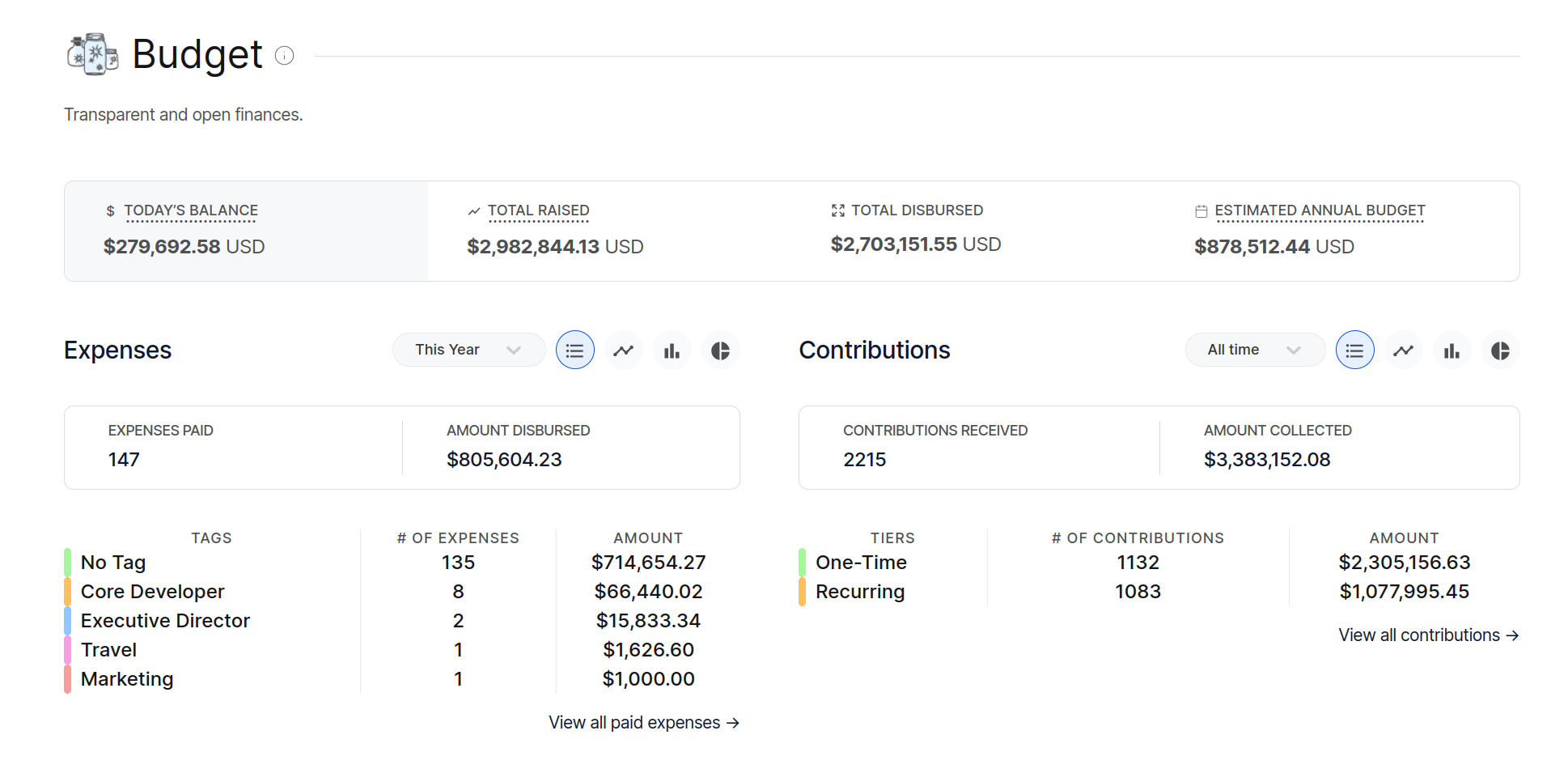
Alt...
Screenshot of the PHP Foundation's finances on Open Collective
![[?]](https://s3.eu-central-2.wasabisys.com/mastodonworld/accounts/avatars/109/375/273/836/304/518/original/23c2345ac9ab48d9.jpg)
Small open-source Android app of mine: Contacts2Xls. It exports your phone contacts to an .xls spreadsheet and imports them back. No account, no cloud, no data collected: the file stays on your device.
Latest update co-authored with #Claude #Opus 5.5.
Play: https://play.google.com/store/apps/details?id=com.giulio.contentprovider
Source: https://github.com/giuliohome/Contacts2Xls
Discover the massive Linux 7.4 Rust update, featuring a massive Zerocopy library upgrade, better diagnostics, and enhanced kernel infrastructure.
![[?]](https://media.infosec.exchange/infosec.exchange/accounts/avatars/117/374/895/604/681/711/original/c5f8143bce08ff17.png)




@DankLinux do You know Dux was the most famous fascist dictator in Italy? Are You aware of this or it is just that you moved from tux to dux without understanding what does it means for a lot of people from a political point of view?
![[?]](https://media.infosec.exchange/infosec.exchange/accounts/avatars/109/366/080/085/214/817/original/09637a48d0f6eafb.jpg)
🗳️ OWASP Board Election voting is OPEN!
3 Board seats are up for election. Make your voice heard and help shape OWASP’s future!
📩 Check your personal and OWASP email for your ballot.
⏰ Closes Oct 30, midnight UTC.
Vote now: https://owasp.org/board/elections/2026
#community #opensource #boardelections

Als ich von dem neuen OpenDesk-Partnerprogramm erfahren habe, hatte ich mich direkt als Reseller beworben.
Allerdings war ich damit noch zu früh, da zuerst Distributoren lizenziert werden mussten, über die die Reseller agieren können.
Aus Dresden ist da die B1 Systems GmBH @b1systems@mastodon.social dabei :)
RT @NeoAIForecast: 🚨 @NVIDIAAI hat gerade seinen eigenen lokalen Inference-Server im Stillen veröffentlicht...
mehr auf Arint.info
#AI #GPU #MachineLearning #NVIDIA #OpenSource #Rust #arint_info
![[?]](https://murad.social/fileserver/01QKH42GJVPPGRH3DKYR3YCTTK/attachment/original/01M5T6Q6Q9PESF1DKCEN4642B0.png)

27 practical lessons, a 30-day learning path, and plenty of examples to help you get comfortable with Org Mode in Emacs.
The cURL vulnerability reporting policy now routes low and medium severity bugs to public GitHub issues to alleviate maintainer triage burdens.
![[?]](https://toot.wales/system/accounts/avatars/117/048/639/186/364/019/original/7d0053d5f0fd6a41.jpeg)
We're organising a community mapping event in Llanfairfechan in November!
Whether you have never mapped before or whether you are an experienced mapper, come along for an evening of mapping and fun! 💚
https://osmcal.org/event/5373/
#openstreetmap #osm #mapathon #cymru #wales #opensource

Alt...
Poster with information about the mapping event in Llanfairfechan Library on the 23rd of November at 6PM and QR codes to the event (link is in the post)
Guten Morgen
CachyOS Hello ist das Willkommensfenster, das sich nach der Installation beim ersten Anmelden öffnet. Später findest du es im Startmenü wieder. Es bündelt die wichtigsten ersten Schritte an einer Stelle, damit du nicht durch mehrere Programme suchen musst.
Der Bereich Optimierungen zeigt dir einzelne Dienste mit einer kurzen Beschreibung. Du kannst Bluetooth einschalten, RAM für Browserprofile nutzen, Prozesse bei knappem Speicher beenden lassen, die Prozessprioritäten automatisch anpassen oder einen Hinweis auf Updates im Benachrichtigungsfeld aktivieren. Jeder Schalter lässt sich später wieder ausschalten.
Die Dienstprogramme decken typische Reparaturen und Wartungsaufgaben ab. Dazu gehören eine Aktualisierung des Systems, das Entfernen verwaister Pakete, das Leeren des Zwischenspeichers, das Bewerten der Mirrors, das Zurücksetzen der Schlüsselringe und notfalls eine Neuinstallation aller Programme. Dort sitzen auch die Einstellungen für DNS und die Hilfen bei hängenden Updates.
Der letzte Punkt installiert zusätzliche Anwendungen aus einer sortierten Liste. Für den Einstieg reicht meist ein Blick auf die Schalter und eine Aktualisierung. Ich habe beim ersten Öffnen nur geschaut und später einzelne Punkte ausprobiert. Warst du am Anfang mutiger und hast gleich etwas umgestellt?
#PwnEscape: Kritische Lücke in #LinuxKernel erlaubt VM-Ausbruch | Security https://www.heise.de/news/PwnEscape-Kritische-Luecke-in-Linux-Kernel-erlaubt-VM-Ausbruch-11492131.html #Patchday #Linux #OpenSource
A study by Terra Security reveals flawed security patches surged in 2026, creating recurring bypasses and new vulnerabilities in open source software.
#Cybersecurity #OpenSource #SoftwareSecurity #LinuxKernel #PatchManagement
https://meterpreter.org/flawed-security-patches-surge/?utm_source=mastodon&utm_medium=jetpack_social
![[?]](https://media.infosec.exchange/infosec.exchange/accounts/avatars/112/418/209/839/293/422/original/a94e04e829a1f70d.jpg)
Well, it happened. My first security update for my first serious app.
This week the private keys of eight intermediate CA certificates leaked. Browsers blocked them within hours, but software that ships its own certificate list needs its own update. Mine does, so v0.3.4 is out.
Somehow it feels like a rite of passage.
https://github.com/ColorcodedNL/local-transcribe-for-iconik/releases/tag/v0.3.4
![[?]](https://media.hachyderm.io/accounts/avatars/109/340/844/974/635/872/original/a61407f4695cdb47.png)
Spell checking without sending everything you type to the cloud
A grammar checker in the browser reads everything you write: mails, chat messages, internal documents, notes about customers. With most tools, all of that goes to a vendor's cloud.
For a long time, LanguageTool was the friendly exception. Its checking engine is open source (LGPL-2.1), it is still actively developed, and you can run it on your own machine. The browser add-on took a different path:
- 2019: the add-on became closed source. The team said they had to pay people to work on it.
- April 2023: Learneo, the parent company of QuillBot, bought LanguageTool. The open-source engine was promised to stay unaffected, and so far it has.
- March 2026: the browser extension became Premium-only. After a 14-day trial, it stops underlining mistakes for free users. The reason given: "The rise of generative AI has made it more challenging to sustainably monetize our offering." Free users are pointed to QuillBot.
So I built Inkling. It is an open-source (Apache-2.0) extension for Chrome and Firefox that talks only to the LanguageTool server you choose. It needs no account and has no trial. It is a fork of the browser extension of Harper by Automattic. The Harper team did the hard work of placing marks correctly in Google Docs and the common rich-text editors.
Running your own server takes one command:
podman run -d -p 8010:8010 docker.io/erikvl87/languagetool
(Docker works the same way.) Then install Inkling, enter http://localhost:8010 and click "Save and Test". Your text never leaves your laptop. A team can also share one server on its internal network.
Chrome: https://chromewebstore.google.com/detail/inkling/lncfkjkgeoepkinifaggpblhpbenemej
Firefox: https://addons.mozilla.org/firefox/addon/inkling/
Source: https://github.com/oetiker/inkling
Thanks to the LanguageTool developers for keeping the engine open, and to the Harper team for the browser integration.
#privacy #opensource #languagetool
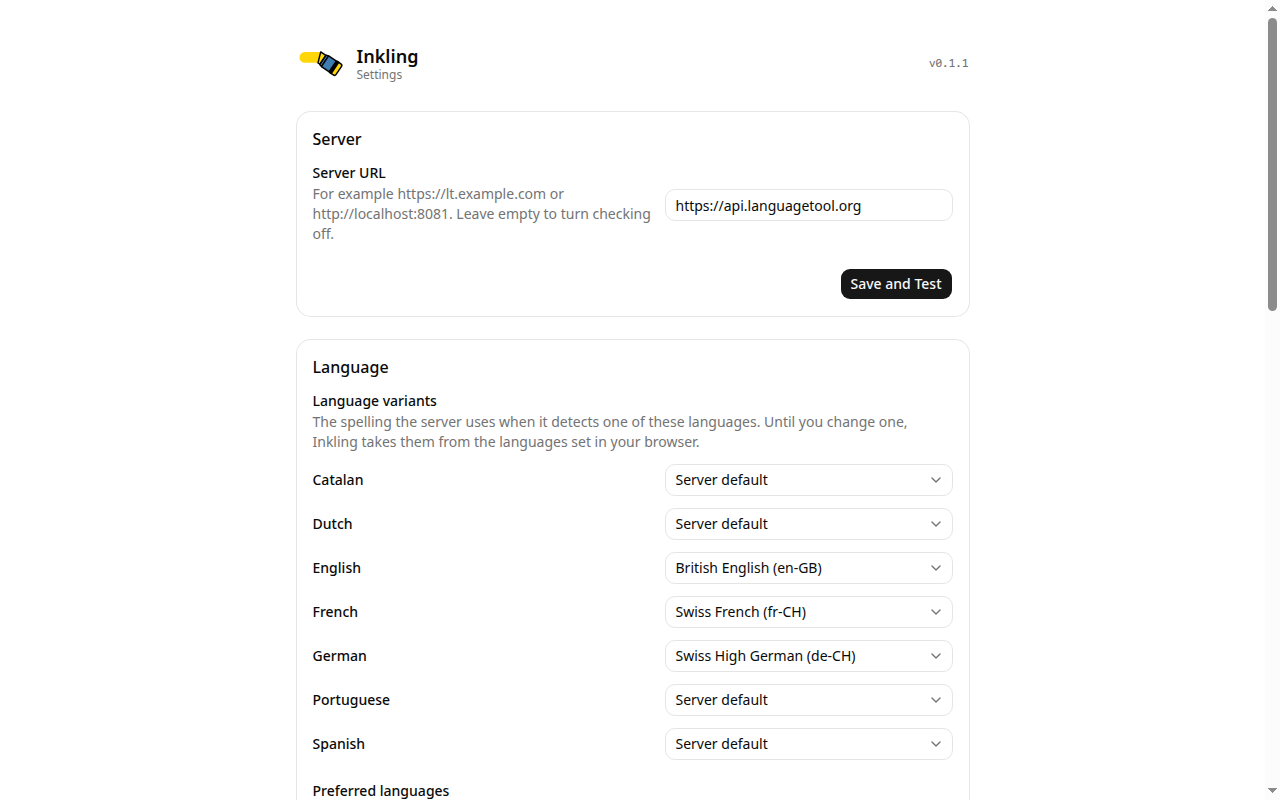
Alt...
inkling settins screen
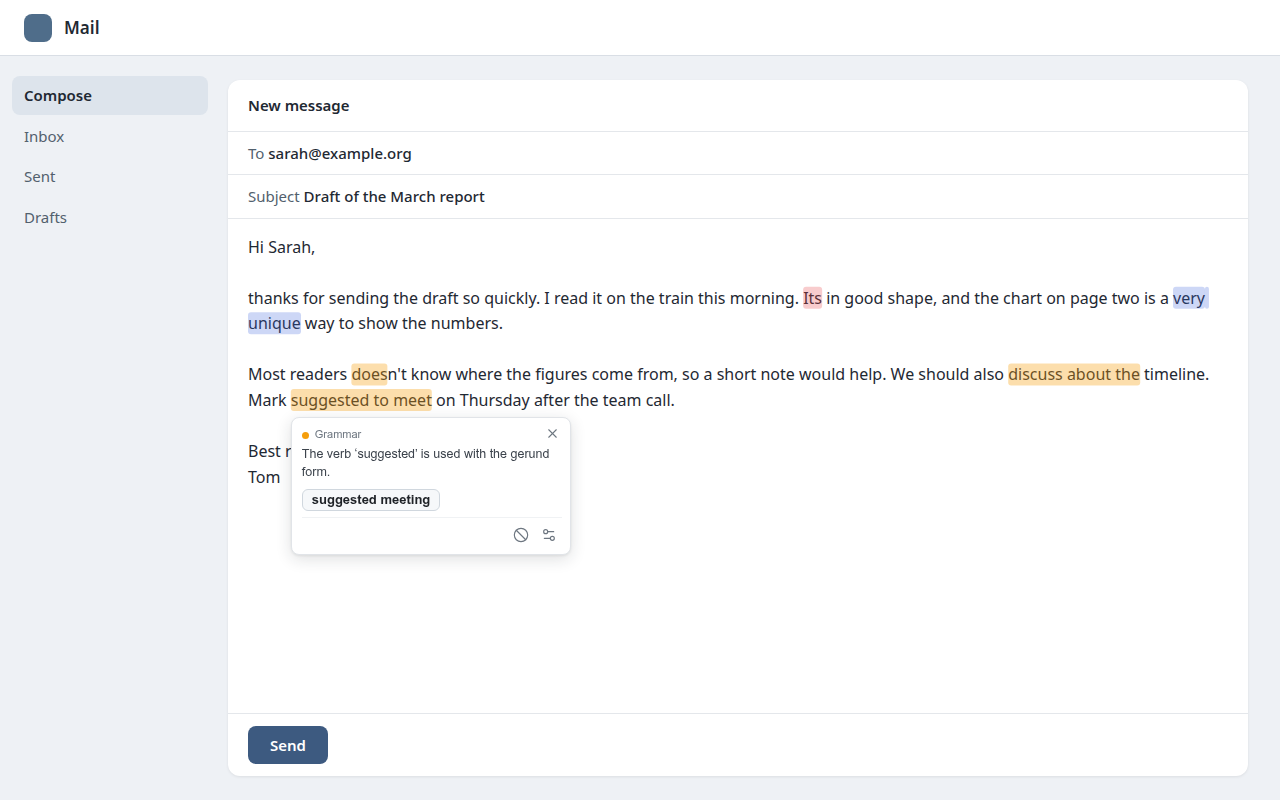
Alt...
inkling demo screen
Alt...
inklink ad
![[?]](https://files.mastodon.social/accounts/avatars/115/963/082/724/170/206/original/9e32ea01e463c00e.jpg)
Wie steht ihr zu den geclonten Adobe Programmen von Artcraft?
Hab mich kaum damit befasst aber finde es schon eine krasse Ansage gegen diesen Konzern. Die Frage ist aber auch ob das rechtlich standhalten kann.
![[?]](https://cdn.fosstodon.org/accounts/avatars/110/317/179/950/091/199/original/7cff59719d9028ea.jpeg)
As I reflected on what I experienced at #FOSDEM, the idea of organizing a devroom dedicated to #diversity was born.
Together with @Gina @_elena we submitted the proposal to organise a #DEI devroom at #FOSDEM27. It got rejected. 😢💔
Every year we leave #FOSDEM inspired by the people we meet & the passion for #opensource. And every year we also find ourselves thinking about how much greater it could be if more people with different perspectives were part of those conversations.
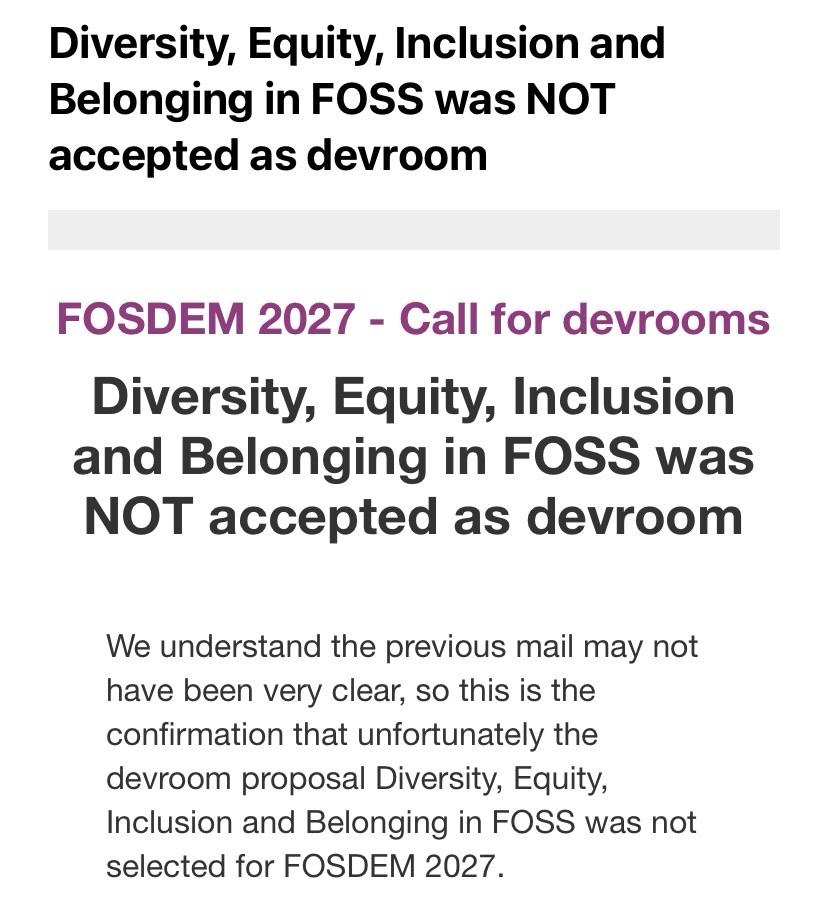
Alt...
An email notification regarding the rejection of the devroom proposal titled "Diversity, Equity, Inclusion and Belonging in FOSS" for FOSDEM 2027. The message emphasizes that the proposal was not accepted and aims to clarify previous communications.
Here's how to automatically post to Mastodon: https://cromwell-intl.com/open-source/python-social-media-automation/?s=mb #OpenSource #Python #TwitterMigration

![[?]](data:image/png;base64, iVBORw0KGgoAAAANSUhEUgAAAEAAAABAAQAAAACCEkxzAAAAUUlEQVQoz43R0QkAMQwCUDdw/y3dwEvsvzlL4X1IoQkAisKmwfAFT3RgJHbQezpSRoXEqeqCL9BJBf7h3QbOCCxV5EVWMEMwG7K1/WODtlvxAYTtEsDU9F34AAAAAElFTkSuQmCC)
2026 so far:
• DEF CON 34 — live demo
• RootedCON, Madrid
• HKOSCon, Hong Kong
The roadmap is community-driven — what should we build next?
Discord → discord.gg/5HjujkScC
Code → github.com/BugTraceAI
An AI scanner that only guesses is a liability.
In BugTraceAI:
• AI plans and reasons
• Real tools validate
• Evidence kept for every finding — requests, code, traces
Verify first. File second.
→ github.com/BugTraceAI
Crypto, Mixers, and Traceability: Why Bitcoin Was Never Anonymous
The fifth installment in a series about the darknet. In previous installments, I’ve debunked myths about the darknet, explained how darknet marketplaces work, and discussed the lifecycle of leaked data…
![[?]](https://f2.tchncs.de/accounts/avatars/112/688/693/147/815/844/original/9e589cce009e3b3b.png)
Time for a new #introduction
Been offline for some time now but getting tired of Instagram again so here we are.
- #union member and #activist from #germany ( #igmetall )
- #coding on #macbook #m1
- Google pixel 7 running graphene os
- lover of #foss / #opensource
- #selfhosting my own services
- #traveling europe in my #oldtimer caravan #vanlife
Wanting to post on #privacy, #coding, #selfhosting.
Lobbying for open software and real social networks with organisations, unions, councils etc.
Some politics may slip in here or there, wanted to do two different accounts but don't have the time to maintain one.
Happy to meet you all!
RT @Marktechpost: ▲ Google hat gerade TorchTPU open-sourced, ein natives PyTorch-Backend, das Google TPUs zu einem gewöhnlichen PyTorch-Gerät macht.
mehr auf Arint.info
#AI #Google #MachineLearning #OpenSource #PyTorch #TPU #arint_info
ICS[AP] updated CISA ICS Advisories Master File for 10/20/2026 & the following year's CSVs:
CISA_ICS_ADV_2026_10_20_26.csv
Available @ ICS[AP] GitHub:
https://github.com/icsadvprj/ICS-Advisory-Project/tree/main
A new repository is now live at Codeberg.org/NoiseBoxWorks/WyseCrawler. All the stuff you need to make a Dell Wyse 3040 Thin Client into a stand-alone router-based data obfuscater.
Stand up to Big Data! Poison your data with NoiseBox.
https://youtu.be/PmEvlzuw-JQ?si=X3fiZHm0hZQYqsqC
#NoiseBox #Privacy #DataPrivacy #OpenSource #SelfHosted #Homelab #Infosec #DellWyse #Wyse3040 #ThinClient #Linux #Python
![[?]](https://cdn.masto.host/floss/accounts/avatars/000/000/001/original/f46366df9e719e88.png)
 [
[Has anyone come across open source online discussion platform software similar in features to #Discourse but not filled with AI slop?
#COSMIC 1.11 Desktop Environment Released with New Touchpad Settings, Better Support for Hybrid GPU Systems, and More https://9to5linux.com/cosmic-1-11-desktop-environment-released-with-new-touchpad-settings
@system76 #Linux #OpenSource #FOSS
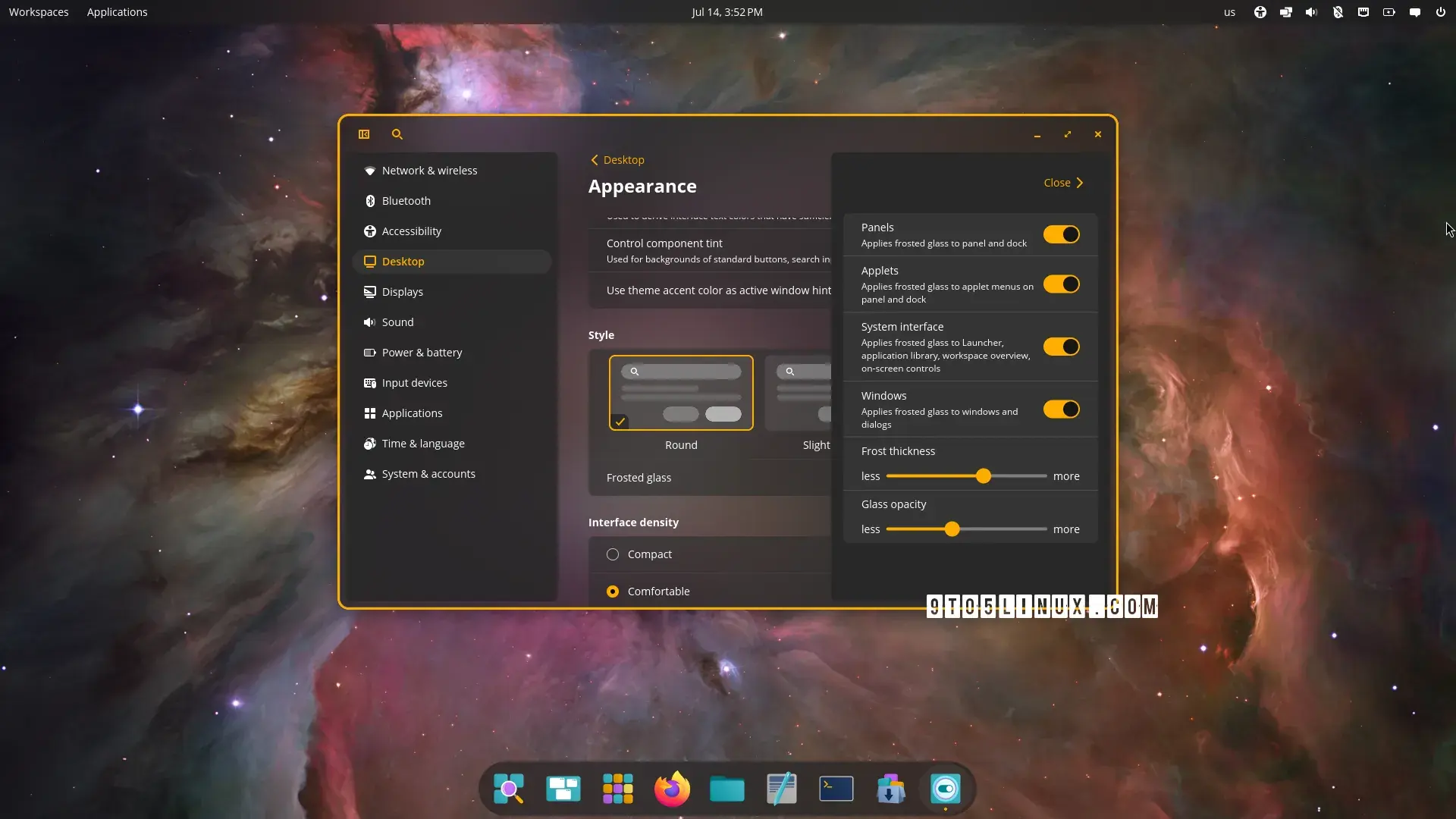
Alt...
A screenshot of the COSMIC desktop environment showing the COSMIC Settings app.
![[?]](https://files.mastodon.social/accounts/avatars/108/288/607/816/054/957/original/44ef33fd13454e94.png)
An experimental Wine port brings Windows app and gaming support to OpenBSD, with 64-bit applications and even The Witcher 3 running successfully.
https://linuxiac.com/wine-on-openbsd-yes-and-it-can-already-run-the-witcher-3/

Alt...
An experimental Wine port brings Windows app and gaming support to OpenBSD, with 64-bit applications and even The Witcher 3 running successfully.
![[?]](https://files.mastodon.online/accounts/avatars/109/261/740/815/568/887/original/89e7e0df17452562.jpg)
Eureka! Gnumeric has arrived for RISC OS. #OpenSource #Spreadsheet
https://www.riscosopen.org/forum/forums/1/topics/20611
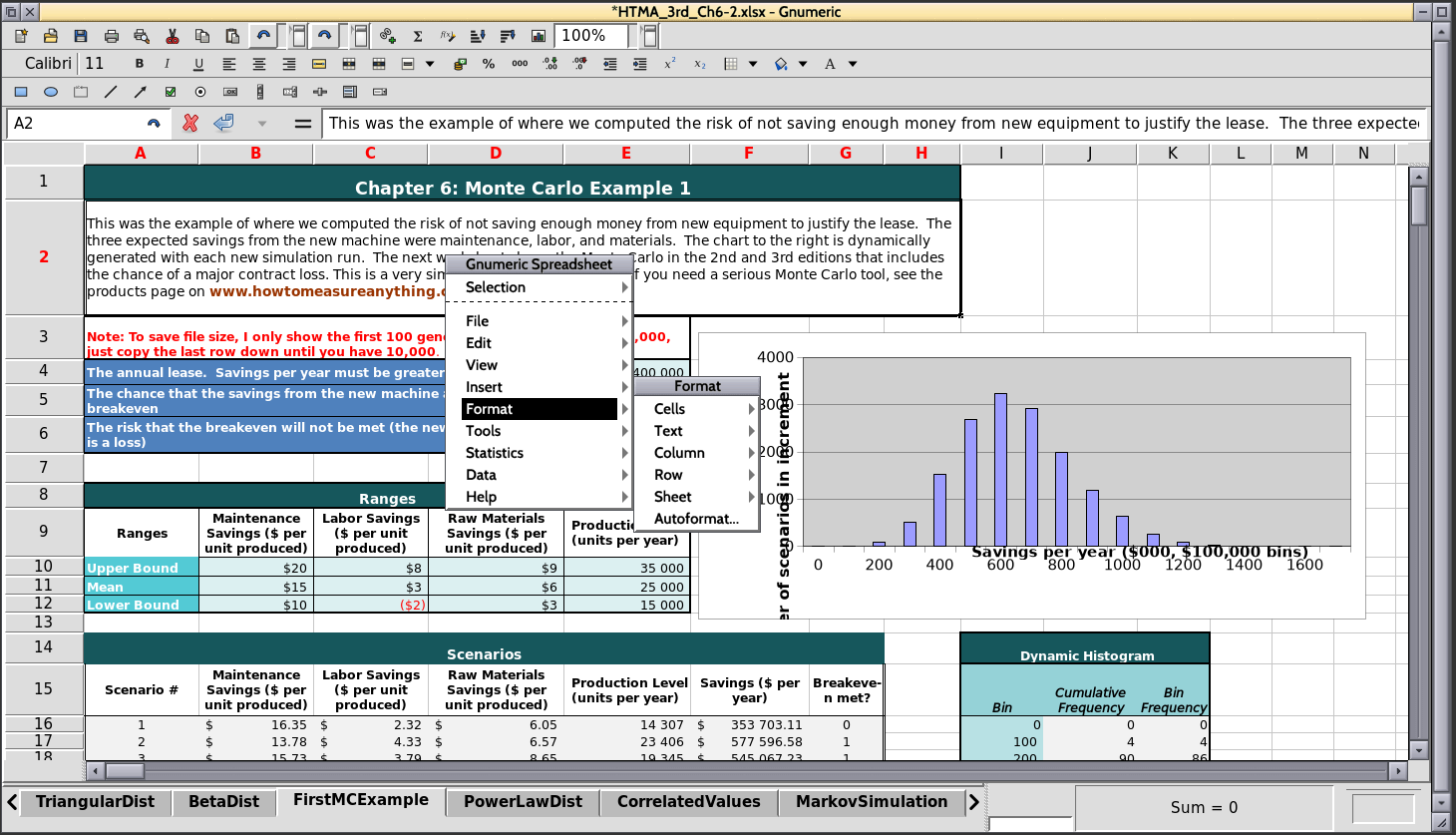
Alt...
Gnumeric is depicted, running on RISC OS
edgie.me Statistics:
👤 Users: 9 (Since yesterday: 0 ➡️)
👥 Remote Accounts: 314.757 (Since yesterday: 1.339 ↗️)
😀 Local Emojis: 270 (Since yesterday: 0 ➡️)
🙃 Remote Emojis: 18.624 (Since yesterday: 131 ↗️)
📡 Instances: 10.512 (Since yesterday: 28 ↗️)
📝 Local Statuses: 25.472 (Since yesterday: 49 ↗️)
❤️️ Likes of local Statuses: 1.186 (Since yesterday: 11 ↗️)
🔁 Boosts of local Statuses: 265 (Since yesterday: -15 ↘️)
🗒️ Remote Statuses: 752.481 (Since yesterday: 4.236 ↗️)
🏷️ Hashtags: 193.398 (Since yesterday: 83 ↗️)
🚫 Blocks:
- Domain Blocks: 23 (Since yesterday: 0 ➡️)
- Remote User Blocks: 169.000 (Since yesterday: 54 ↗️)
- Local User Blocks: 34 (Since yesterday: 0 ➡️)
📡 Top 10 Remote Instances:
- mastodon.social: 856 posts
- flipboard.com: 526 posts
- mstdn.social: 142 posts
- tomkahe.com: 141 posts
- infosec.exchange: 133 posts
- chaos.social: 111 posts
- mastodon.online: 76 posts
- derstandard.at: 70 posts
- troet.cafe: 61 posts
- social.heise.de: 57 posts
🏷️ Top 10 Hashtags:
- #steam: 75 posts
- #news: 56 posts
- #indie: 45 posts
- #linux: 33 posts
- #casual: 29 posts
- #opensource: 28 posts
- #fotovorschlag: 26 posts
- #action: 21 posts
- #adventure: 20 posts
- #it: 19 posts
The Xodus Nexus is "an experimental open-source project that aims to allow Linux and SteamOS users to access PC Game Pass."
PC Gamer: Microsoft won't like this open source project to get Game Pass working on SteamOS and Linux, but I think it's pretty neat https://www.pcgamer.com/software/microsoft-wont-like-this-open-source-project-to-get-game-pass-working-on-steamos-and-linux-but-i-think-its-pretty-neat/ #Microsoft #Linux #SteamOS #opensource
![[?]](https://snac.bsd.cafe/teajaygrey/s/2d49dbf4b3c8576152b35aef1cffac46.gif)
https://github.com/macports/macports-ports/pull/35738
It appears as if GitHub's Continuous Integration checks have passed OK!
It's up to someone else with commit access to merge it.
Thanks to you, aleteoryx, Uilebheist, nowster, koru, daltux, pmjv and anyone else who may have contributed to this release whom I may have inadvertently overlooked!
Again, my apologies for the delay! Traveling without a laptop and then realizing I needed to rework MacPorts' Makefile.patch made this take a lot longer than I would customarily prefer as far as down streaming latency goes.
In unrelated news: Denver now has FOUR Wax Trax Records locations! Mile High DJ Supply's spot in Arvada has a turntable set up reminiscent of DJ Q*Bert's Octagon (facilitatin 4 skratch deejays jammin together with 8 turntables and 4 mixers feedin into one sound system). The Colorado Symphony's performance of compositions they commissioned by Joe Hisaishi was wonderful! Though, Hisaishi was apparently unable to travel to conduct. Here's hoping he will not have difficulties with future travel plans and will be conducting at the SF Symphony for "Hisaishi conducts Hisaishi" since I have a ticket to one of those three shows later this week.
#snac #MacPorts #OpenSource #ActivityPub #Mastodon #NoDatabaseNeeded
#NoJavaScript #NoCookiesEither #NotMuchBullShit #snacAnnounces
9to5Linux: qBittorrent 5.3 BitTorrent Client Is Out as a Major Update, Here’s What’s New https://9to5linux.com/qbittorrent-5-3-bittorrent-client-is-out-as-a-major-update-heres-whats-new @9to5linux @mariusnestor #opensource